A customer is waiting while you check the stockroom for a navy jumper in medium. Your till says the style is available, but the rail tells a different story: plenty of grey, no navy in the size they want. Choosing POS software for a clothing store starts with preventing that mismatch, not with finding a faster way to print receipts.
The right system should help staff identify the exact garment, take payment, recover returned stock and keep online availability believable. The buying test is simple: can it handle your actual sizes, colours and shop routines without workarounds you'll forget on a busy Saturday?
Table of Contents
- Why Clothing Shops Outgrow a Basic Cash Register
- The Features a Fashion POS Must Handle
- Returns and Exchanges That Put Stock Back Right
- Weighing Cost and Data Control
- How to Move Your Shop Onto a New POS Step by Step
- How Stocky POS Covers Each Need
- What Stocky POS Does Not Do
- Choose the Setup That Fits and Take the Next Step
Why Clothing Shops Outgrow a Basic Cash Register
Say your register shows twelve jumpers in stock. Navy medium has sold out, while grey medium sits unsold. If the register records only jumper sales, those remaining garments look interchangeable, even though your customer certainly doesn't see them that way.
The inventory problem isn't new. The 2017 Zebra retail vision study reported average retail inventory accuracy of approximately 65%, while dependable omnichannel operations required at least 90%. These are historical retail findings, not a benchmark for your particular shop, but they explain why a product total isn't enough.
A wrong count can lose a sale when staff promise something they can't find. It can also tie up cash when you reorder grey medium because nobody noticed that navy medium was the missing variant.
The work happens at the counter, but the consequences reach the stockroom.

The jobs behind every sale
A variant-aware POS must:
- Reduce the exact variant sold, rather than an undifferentiated style total.
- Keep stock movements together, including receiving, transfers, counts and returns.
- Expose discrepancies early, while staff can investigate rather than guess.
A basic cash register may record takings correctly without doing any of those jobs. Our guide to retail POS software explains that broader distinction.
Accurate stock also supports the human side of retail. Cedar & Lily Clothier's guidance on consistent service from fitting room to checkout is useful context: staff need dependable information to carry a customer's request through to a completed purchase.
Don't accept “jumpers in stock” as an answer when the customer asked for navy medium.
The Features a Fashion POS Must Handle
A parent product groups related garments. Its variants represent the combinations customers buy, such as navy medium and grey medium. Each combination needs its own stock-keeping unit, or SKU, so selling one doesn't reduce another.
SwipeSavvy's clothing-retail guidance describes this variant-level approach and the need to connect it with purchasing, returns and online orders. The important distinction is between grouping garments for browsing and separating them for stock control.
The relationship should look like this:
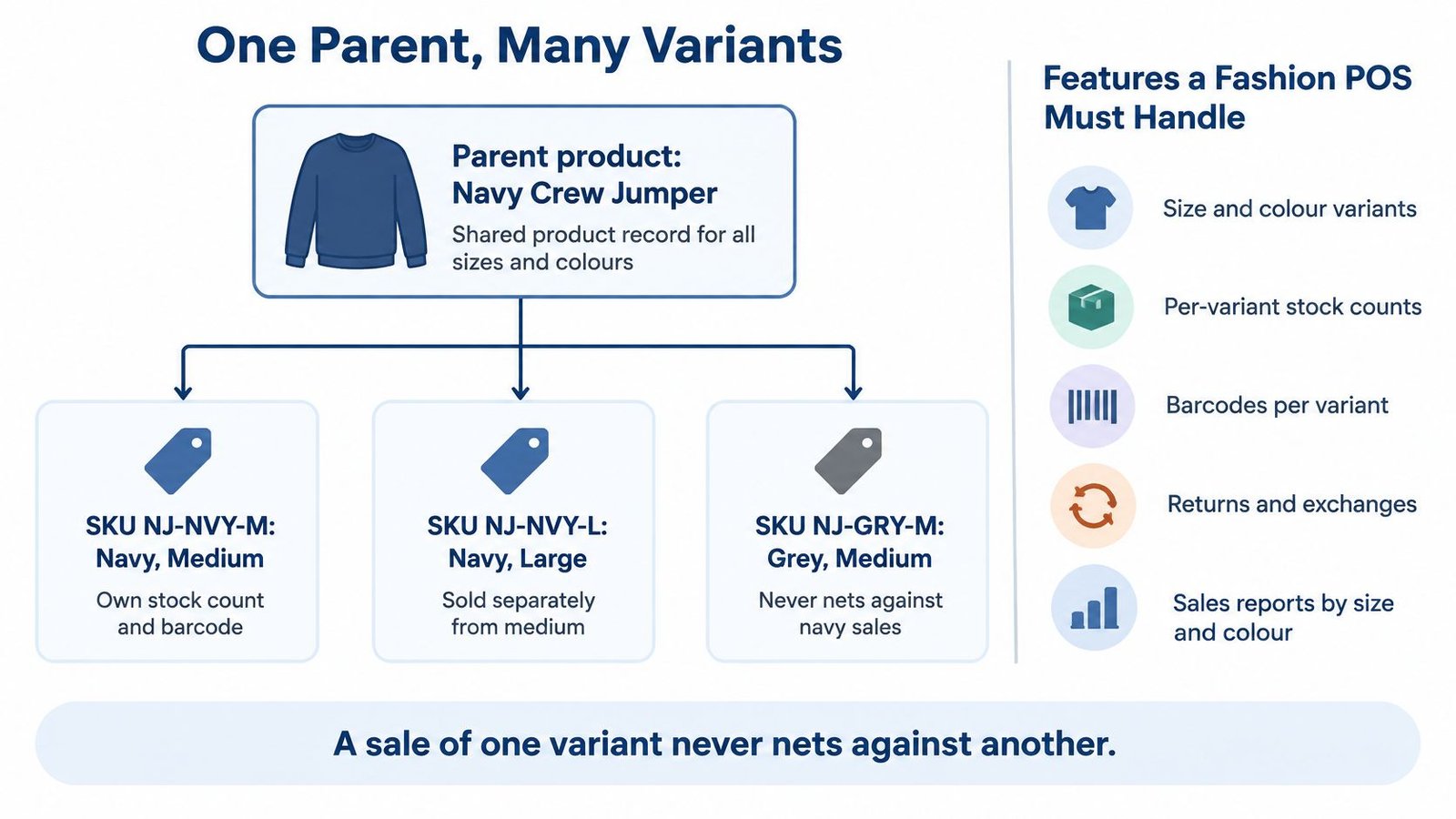
Requirements a clothing store POS must meet
Use your own catalogue to test these requirements. A prepared demonstration can hide awkward combinations, inconsistent labels or missing sizes.
| Requirement | Why it matters in a clothing shop | Test before you buy |
|---|---|---|
| Size and colour variants | One style needs many sizes and colours, each sold separately | Enter one sample jumper with four sizes and three colours |
| SKU matrix | Each size-colour combination needs its own code, price and count | Scan two sample variants and confirm each reduces its own stock |
| Stock and serial tracking | Stock must be known per variant at every location; individual serials matter only for suitable merchandise | Count a sample variant across two warehouses |
| Returns and exchanges | A returned item must go back to the exact variant | Return one sample size, exchange it for another and check both counts |
| Barcode and labels | Shelf and price labels keep the till and rail matched | Print a label on your own label printer |
| Multi-register and mobile checkout | Busy periods may need another till or handheld | Run a pair of registers against the same stock record |
| Payments and integrations | Customers may split payment, and card-terminal arrangements need checking | Pay a sample sale with cash and card, then inspect the receipt |
| Seasonal stock and markdowns | New arrivals and clearance require controlled price changes | Apply a price change or promotion to chosen products |
| Loyalty points | Returning customers need predictable points rules | Confirm that your intended earning rate can be set |
| Online store sync | Online orders must affect the correct store variant | Place a sample online order and check the store count |
A matrix isn't necessarily a size-grid screen
A system can store variants without offering a fashion buyer's grid for ordering across sizes. It can also support price changes without providing collection planning or seasonal budgets. Test those as separate requirements.
Our Stocky POS & ERP supports pricing clothing across sizes and colours. It's a general retail system also built for retail counters, supermarkets, grocery stores, pharmacies, repair workshops and warehouses, including serial tracking for electronics and weighing produce at the till.
For catalogue preparation, NanoPIM's guide to consistent marketplace variations provides useful context for keeping variant names consistent. For a WooCommerce shop, our WooCommerce POS sync solution is relevant to testing how the catalogue and inventory connect.
A dedicated size-grid or seasonal-collection tool isn't documented for Stocky. Don't treat ordinary variant support as proof that either exists.
Returns and Exchanges That Put Stock Back Right
A refund button answers a money question. It doesn't answer what should happen to the jumper.
A returned garment might be ready to resell, need a markdown, require repair or be unsuitable for sale. Putting all returned items straight into available stock can leave the website promising a garment that's sitting behind the counter awaiting inspection.
The 2025 Radial State of Returns report found that 56% of surveyed apparel and footwear brands recorded return rates of at least 30%, while 91% offered refunds or exchanges before inspecting the item. Those brand findings highlight why refund approval and merchandise inspection should be treated as separate decisions.
Recover the garment, not just the payment
Your return procedure should distinguish refund, exchange and store credit from the item's physical condition. A refund can be approved while the garment remains unavailable pending inspection. Staff shouldn't have to pretend it's resale-ready to finish the financial transaction.
For an exchange, think in stock movements. The returned medium comes back into the correct colour and size record, subject to inspection. The large the customer takes leaves its own record. Any payment difference belongs to the transaction, not to a manual stock correction.
An online purchase returned in-store adds another test. Staff need to locate the original order, identify the customer and establish the original payment and discount before making an adjustment. An online-store connector alone doesn't prove that the till can complete that workflow.
A returned garment becomes available for sale when someone confirms it can be sold, not merely when someone authorises a refund.
Controls without punishing good customers
Use return reports to identify patterns for review, not to label frequent returners automatically as dishonest. Someone buying several sizes may need different handling from an unexplained sequence of high-value returns without proof of purchase.
Where the software supports them, use manager permissions, recorded reasons and audit trails for exceptions. Keep customer-segment rules clear enough that staff can explain them, and weigh blanket fees against the effect on legitimate customers.
Ask any vendor these questions:
- Transaction types: Can the till separate refund, exchange and store credit?
- Stock recovery: Does a returned variant go back to its exact size and colour count?
- Channel lookup: Can staff find an online order when the return happens in-store?
- Authority: Who can override a return rule, and is that override logged?
Weighing Cost and Data Control
Self-hosted software and a vendor-run subscription place responsibility in different hands. Compare that responsibility alongside the software bill, especially if you don't have someone who maintains business systems.
Self-hosted and SaaS compared for a clothing shop
| Model | Where your data lives | What you pay | Who keeps it running | Best fit |
|---|---|---|---|---|
| Self-hosted, bought once | Your own server, or UI Lib's dedicated servers on managed hosting | One-time purchase plus hosting; see the product page for the current price. Managed hosting is $12 a month. | You, a provider you hire, or UI Lib on managed hosting | Owners wanting control of records and an upfront software purchase |
| SaaS subscription | The vendor's servers | Recurring subscription; see vendor | The vendor | Owners wanting no server maintenance and accepting an ongoing fee |
An upfront licence isn't the whole running cost. Fill in a budget for software, hosting, backups, updates, server maintenance, training time, downtime, scanners, label printers and accounting integration. Assign a named person to backups and recovery rather than assuming hosting includes everything. You don't have to take the server work on yourself: UI Lib's managed hosting is $12 a month, with Stocky on UI Lib's dedicated servers, installation free, regular backups and security looked after by our team, and you only buy a domain. If you prefer your own hosting, the installation service is a one-time $50.
Our on-premise versus cloud ERP comparison explains the deployment trade-offs. With self-hosting, the database sits on infrastructure you control, but you still need to protect customer records and test how you would recover or move them.
Visibility isn't accuracy
The Deloitte retail industry outlook for 2025 reported that one-third of retail executives planned significant investment in accurate real-time inventory visibility, unified customer views and multiple fulfilment options. A dashboard is useful, but it can still display an incorrect physical count.
Before buying, establish:
- Last-unit handling: What happens when a shop customer and an online customer buy the same remaining variant?
- Location rules: Can stock be reserved or withheld from a channel by location?
- Reconciliation: How are offline sales processed when connectivity returns?
- Exit arrangements: Can historical transactions and customer records be exported in usable form?
Also inspect cycle counts, adjustment approval, transfer records and supplier lead-time information. These determine whether staff can maintain the figures behind the screen.
A smaller shop may be better served by controlled location-based availability than by offering every garment through every channel. Keeping stock back until someone checks it can be preferable to apologising for an order you can't fulfil.
How to Move Your Shop Onto a New POS Step by Step
Migration should preserve a clear link between the garment, its code and its opening quantity. Treat the first import as a rehearsal, not as permission to start trading.
The preparation can be grouped visually:
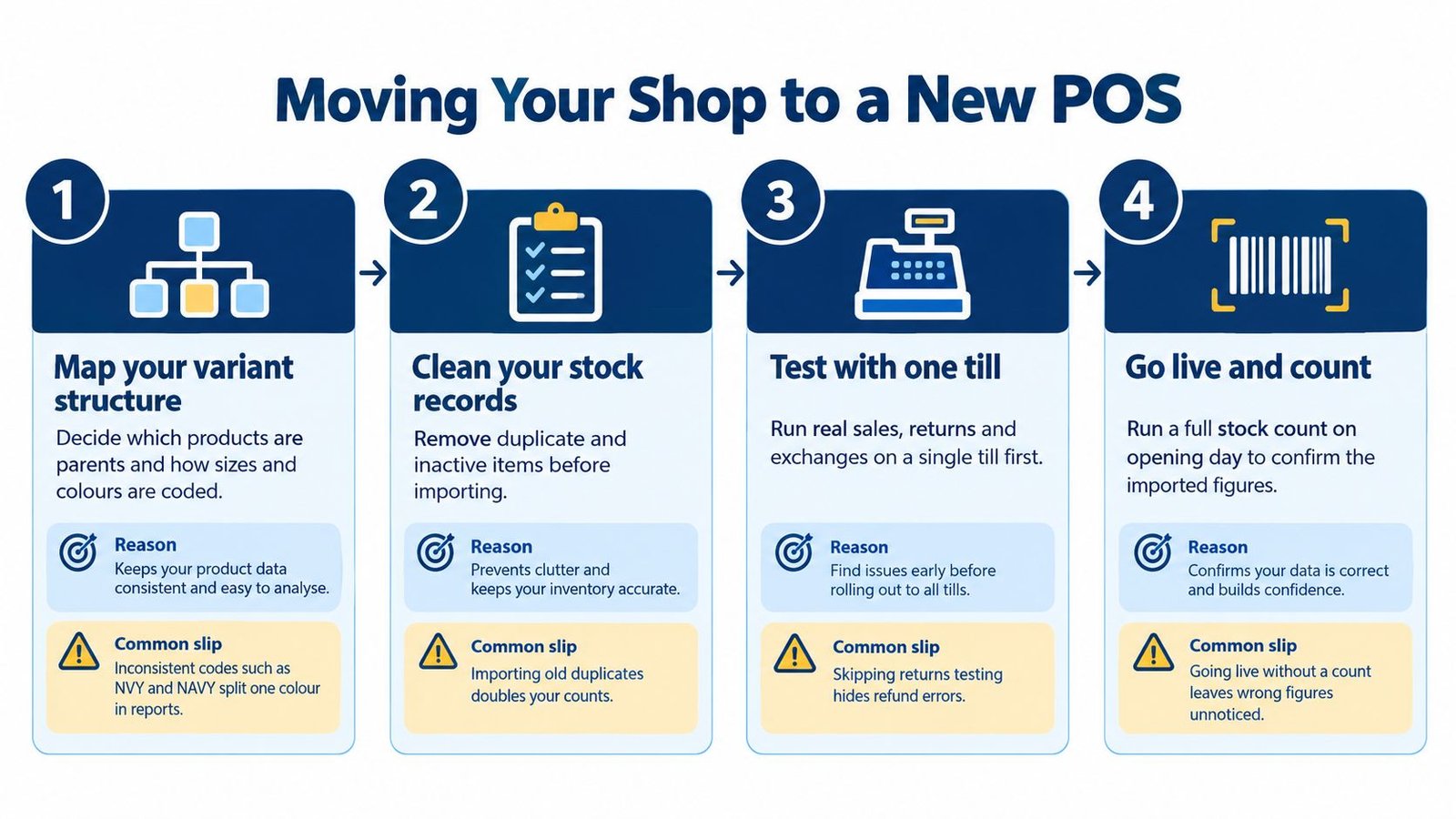
Prepare, reconcile and rehearse
Map your variant structure. Decide which records are parents and how sizes and colours are coded. The common slip is using both NVY and NAVY for the same colour, splitting records that should agree.
Clean the old list and preserve history. Remove duplicate and inactive styles from the migration file, but export and retain old records separately. Don't delete transaction history just because a garment is discontinued.
Import into a test copy. Our CSV and Excel import supports products, customers, suppliers, opening stock, purchases and sales. Importing before variant codes are settled creates avoidable correction work.
Count opening stock by warehouse. Reconcile physical garments against imported quantities. A common mistake is counting the rail but overlooking the stockroom, reserved items or returns awaiting inspection.
Check receiving against purchase orders. Verify expected units, record shortages and overages by variant, and retain supplier-claim notes. The GS1 and Auburn University supply-chain study found that 69% of inbound orders without RFID contained errors identified during picking, shipping or receiving. Don't mark an entire delivery received just because the cartons arrived.
Configure roles and hardware. Our USB and Bluetooth scanners work without drivers, and shelf labels can print from five templates directly to a TSPL label printer. Print and scan a test label; a readable product name doesn't guarantee a scannable barcode.
Rehearse a complete shift. On a copy, open the register with a float, process sales, returns and exchanges, then enter counted cash and a closing note. Check the Cash Register report, including the float. Don't mistake opening cash for sales income.
Test offline recovery. Disconnect an already-open test register, complete a suitable sale, reconnect and verify the transaction and stock movement. Merely seeing the offline screen isn't a recovery test.
Cut over quietly and review closely. Choose a quiet trading day. During the first week, review per-warehouse reports daily and physically check fast-selling variants. The common slip is treating a successful import as proof that daily routines are correct.
How Stocky POS Covers Each Need
Our Stocky POS & ERP is self-hosted retail point-of-sale and inventory software, bought once with no per-till or per-user fees. Its documented features cover the core retail requirements, with fashion-specific gaps that deserve a hands-on test.
| Shop need | Documented Stocky coverage |
|---|---|
| Product catalogue | Single, variable, service and combo products |
| Location stock | Unlimited warehouses, transfers, counts, rack locations and per-warehouse reports |
| Staff access | Warehouse restrictions and unlimited custom roles |
| Checkout | Touch-first register, split and multi-payment sales |
| Customer balances | Partial payments posted to the customer ledger, governed by credit limits |
| Tax and loyalty | Customisable grouped tax rates and spending-based loyalty points |
| Online selling | Built-in store and two-way platform sync |
| Accounts | Double-entry accounting with QuickBooks and Xero sync |
Use the product interface to inspect how staff will find and select garments.
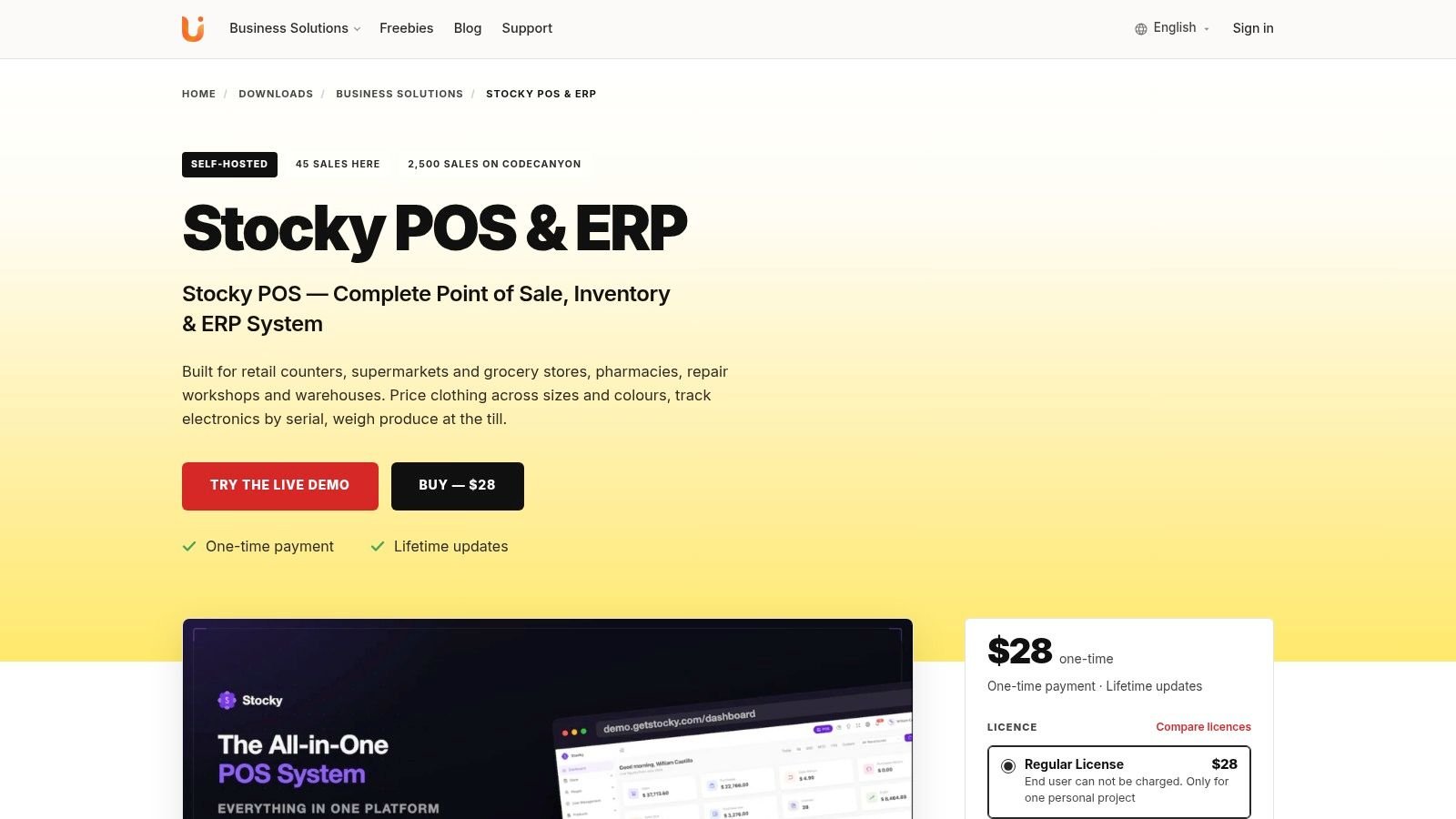
Where the details matter
A parent product can hold size and colour variants, each with its own code, price, cost, image and stock. Warehouse restrictions and custom roles let you separate cashier, stockroom and manager access.
The catalogue also supports batch, expiry, serial and IMEI tracking, although most clothing shops will mainly use variants and barcodes. Customers can access invoices and statements through a portal, and loyalty points are earned on spending at a rate you set.
The built-in online store sits alongside two-way sync with WooCommerce, Shopify, Salla, Jumia and PrestaShop. Accounting includes double-entry books and QuickBooks and Xero sync.
Our Stocky POS download page provides the product details. The retail POS product page and linked live demo let you evaluate the workflow without relying on screenshots alone.
This video provides another view of the interface:
A dedicated exchange workflow and fashion markdown-management tool aren't documented. Our promotions support percentage or fixed reductions on selected products, categories or the cart, but that isn't a seasonal planning system. Test exchanges and price changes before relying on them.
What Stocky POS Does Not Do
Offline selling has edges worth mapping before you commit. The Stocky register description explains that catalogue and customer data are cached on the device, sales queue locally, and reconnection synchronises stock, receipts and the customer ledger. So a till that loses its connection keeps ringing up the navy jumper in medium, but those queued sales only settle the stock count once the sync lands.
Keep these boundaries in your buying checklist:
- Camera scanning needs HTTPS. Serve the site securely before using it, or fall back on USB and Bluetooth scanners, which need no drivers.
- Disconnected tills can oversell. Two offline tills can both sell the last medium of the navy jumper while grey sits unsold. Keep scarce sizes at a connected till or hold them back manually, because variant-level counts are what decide whether you oversell.
- Confirm which register actions run offline. Test in the live demo whether opening a register with a float, closing it with counted cash, and taking card payments still work during an outage before you write your outage procedures around them.
- Mobile is its own app. Stocky Mobile is a native Android and iOS app for your self-hosted server and is sold separately, so check how it fits your floor staff's phones rather than assuming a browser tab covers the same work.
- Fashion planning isn't documented. Don't assume a size-grid or seasonal-collection tool exists; check instead that your own size grid maps cleanly onto variants.
- Partial payments aren't scheduled instalments. Trade-ins, buying used devices for resale and instalment plans with scheduled due dates aren't documented, so a shop running layby-style payments needs another arrangement.
- Hospitality has a different product. Restaurants and cafés are directed to the sister product, Resto.
Check product identity when comparing alternatives
If you're replacing a Shopify inventory setup, Supply Automate's guide to find a replacement for Stocky can help frame the search. Check exactly which Stocky product an alternatives article discusses before applying its comparisons to a self-hosted POS.
For a shop that wants the vendor to handle server maintenance, a managed SaaS system may be a better fit, and so is Stocky on UI Lib's managed hosting if you still want to own the software. Choose on the work you need done, not the product name.
Choose the Setup That Fits and Take the Next Step
Start with where garments physically live and who is allowed to move them. A navy jumper in medium can be gone at the till while grey sits unsold, and that gap is decided at variant level rather than by the product name. Adding registers is easier than untangling a stockroom that staff have been treating as both shop stock and online-only stock.
Recommended setups from one boutique to a chain
These are suggested configurations to test, not hardware bundles.
| Shop profile | Setup to run | Warehouses and roles | Add-ons to check |
|---|---|---|---|
| Single boutique, one till | One register on the variant catalogue, owner and staff roles | One warehouse, two roles | USB or Bluetooth scanner, TSPL label printer, cash drawer |
| Boutique with stockroom and online shop | Register plus online store sync on a shared stock record | Two warehouses, roles for stock staff | Scanner, label printer, online channel check |
| Two or three shops sharing stock | Registers in each shop, transfers between them | Warehouse per shop, users limited to their shop | Scanners, receipt and label printers, accounting sync |
| Multi-location chain | Many registers, per-warehouse reporting, central purchasing procedures | Unlimited warehouses, custom roles per team | Accounting sync, label printing at every site, stock counts by location |
For accounting, agree which sales, refunds, taxes, payments, customer balances and purchase records must reach the books. Confirm the connector's handling of each record with your bookkeeper rather than assuming “accounting sync” covers every reconciliation requirement.
Make the decision with your own size grid
If you want control of records and an upfront software licence, shortlist self-hosted software and decide who looks after the hosting: you, or UI Lib on managed hosting at $12 a month. Check the server requirements before planning your own hosting, and the installation service is $50 once if you bring your own. If you want no server work and no ownership, weigh a vendor-managed SaaS subscription, then judge by records and routines rather than the product label.
If you're undecided, use the live demo linked from the product page with your own size grid. Include an awkward product, an exchange, a split payment and a low-stock online order. Put the navy medium through a return and check that it goes back to sellable stock as the right size and colour, while grey stays put. Don't judge the fit only from the prepared catalogue.
Buying test: Staff should be able to explain what happened to the garment, the money and the customer balance after each test transaction.
Finish by filling in the requirements table, rehearsing migration on a copy and getting clear answers to the return questions. Add an offline scenario that includes last-unit conflicts, reconnection and register closing, because overselling is usually a variant-count problem before it is a till problem.
Our software is a one-time purchase, see the product page for the current price. Make the purchase only when the demonstration matches the routines your staff will follow in daily work.
UI Lib offers self-hosted Stocky POS & ERP for retail checkout, variant inventory, warehouse operations and connected online selling. Visit UI Lib to inspect the product details and open the demo, then test your own clothing catalogue, labels and return scenarios before choosing your setup.