You're staring at two ERP quotes and they don't even look like the same business decision. One is a monthly bill that keeps going, the other is a bigger up-front commitment that puts more control on your side of the table. If you run finance for a small or mid-size business, that's the choice in on premise vs cloud ERP.
On premise ERP means you run the software on infrastructure you control, so the database, patch timing, backups, and much of the maintenance sit with you. Cloud ERP means a provider runs the system over the internet, and you pay for access while the vendor handles more of the day-to-day operations.
UI Lib sells self-hosted software, so it is not a neutral voice in this comparison. That said, the trade-offs are real, and the useful question isn't which model sounds modern, it's which model fits your staff, your cash flow, and your tolerance for ownership. If you want the short version, you're choosing between a hosted subscription, a one-time self-hosted licence, and a managed self-hosted service.
Table of Contents
- The Two Models in Plain Words
- Side by Side Across the Decisions That Matter
- When a Hosted Subscription Is the Better Choice
- When Self-Hosted ERP Wins on Its Own Merits
- The Five-Year Cost Formula You Can Actually Use
- A Short Decision Guide for a Real Shop
- What This Comparison Does Not Do
- Questions Owners Ask Before They Sign
The Two Models in Plain Words
A self-hosted ERP is installed on your own hosting, in your own environment, with your team or technician responsible for running it. A cloud ERP is a hosted subscription where the vendor takes on more of the operational work, including updates and routine maintenance.
That difference matters because “where it runs” is only part of the story. What really changes is who gets the late-night call, who approves the upgrade window, and who owns the backup plan. If you've ever had a branch manager waiting on an invoice screen while IT is still checking a server, you already know why this choice is operational, not academic.
Practical rule: if you want control, self-hosting gives it to you, but control comes with work.
UI Lib's own position is straightforward. Its applications are sold as self-hosted business software, so it's a voice in favor of ownership rather than a neutral referee. If you want to see that ownership argument in its simplest form, the company lays it out on its own comparison page at own vs rent.
For a finance lead, the useful frame is this. A hosted subscription buys convenience. A one-time self-hosted licence buys control. A managed self-hosted service tries to split the difference.
Side by Side Across the Decisions That Matter
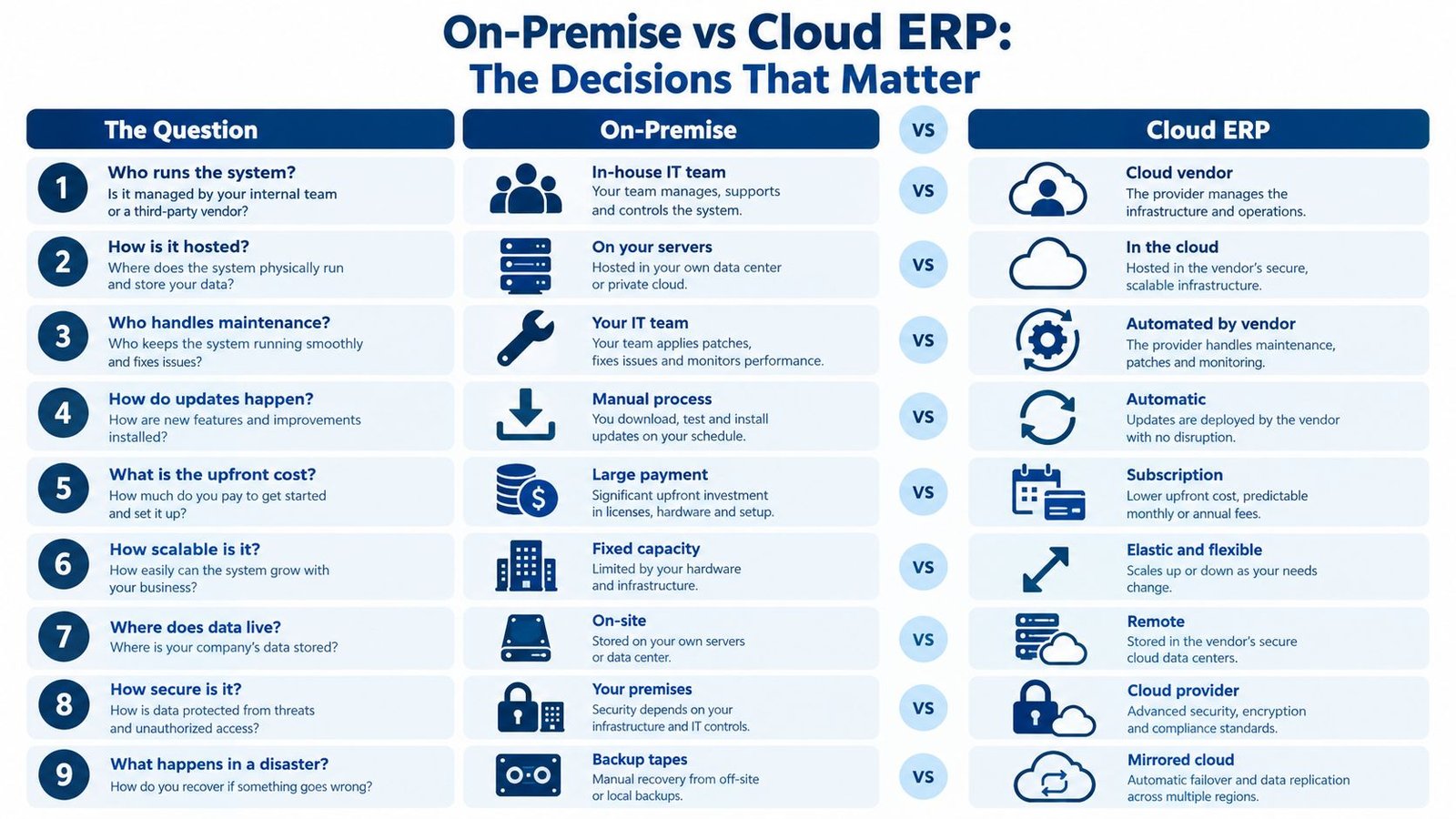
| Criterion | On premise (self-hosted) | Cloud (hosted SaaS) |
|---|---|---|
| Who runs it | You or your technician | The provider |
| Cost structure | One-time licence, plus your hosting and maintenance work | Recurring subscription |
| Upfront versus recurring | More control over upfront ownership, less recurring software billing | Lower initial setup burden, ongoing monthly spend |
| Customisation | Deeper control over code and deployment choices | More bounded by vendor rules and supported extensions |
| Updates | You apply them, including file copies and migrations | Vendor applies them centrally |
| Where the data lives | In your own database on your own hosting | In the provider's environment |
| Scaling | You expand your own hosting and support capacity | Vendor-managed scaling is the norm |
| Backups and security | You own the plan and the follow-through | The provider handles more of the operational side, but responsibility is still shared |
| Support | Your technician, your partner, or the vendor if included | Vendor support contract is usually part of the deal |
The row people misread most often is updates. In self-hosted ERP, updates are your job, and for products like Resto and Nexus that means copying files and running migrations rather than clicking a magic button. In cloud ERP, the vendor applies changes centrally, which is why hosted subscriptions feel easier on a busy owner.
If your board cares most about control, data custody, or customization, the choice is close. If it cares about who gets woken up at 2 a.m. and who pays for the next server, the choice is not close at all.
For a broader migration checklist, cloud migration tips for SMBs gives a useful view of the operational questions teams should ask before they move.
When a Hosted Subscription Is the Better Choice
A hosted subscription is the better choice when you have no technical person on staff, or when you want the vendor to handle updates, security, and backups. It also fits the owner who wants one support contract and one place to call when something breaks.
That is the cleanest case for cloud ERP, and it's a strong one. You're buying operational relief, not just software access. The trade-off is that the relief comes with recurring billing and less freedom to bend the system to your own way of working.
A subscription model is easy to approve and hard to escape.
That's the catch most sales decks skip. Monthly fees compound, and customisation stays bounded by what the vendor will support. For many small businesses, that's still the right trade because predictable administration matters more than deep control.
There's also a governance catch. Cloud does not erase responsibility, it redistributes it. The provider may run more of the system, but your business still owns user identities, access policies, and the data you put into the application.
If you want a plain-language primer on hosted deployment, shared hosting is a useful reference point for what “someone else manages the server” really means in practice.
When Self-Hosted ERP Wins on Its Own Merits
Self-hosted ERP wins when you want your data in your own database, on your own hosting, under your control. It also wins when you want to pay once for the software instead of stacking a new subscription line every month.
That control has a price, and it's not hidden. Someone in your business, or someone you pay, has to be able to set up hosting, meaning a PHP version, a database, and a web server pointed at the right folder. If nobody can do that, self-hosted software is the wrong move unless you use a managed service.
For products like Resto and Nexus, updates are applied by copying files and running migrations, and there is no automatic updater by design. That sounds inconvenient until you realize what it buys you, a stable production server that you can test before changes go live. Owners who hate surprise change windows usually like that trade.
The UI Lib catalogue also includes products that lower the technical bar. Resto and Nexus don't need Node, Redis, queue workers, or cron. If you want the technical requirements spelled out in one place, the requirements page is the right place to look.
Here's the part most comparison articles avoid saying out loud. Self-hosted ERP is the better choice when you want control over data, code, and update timing, but you are also accepting responsibility for keeping the thing alive.
UI Lib also offers a managed self-hosted service, where the installation is managed for you, starting from $20 a month. That narrows the gap for non-technical owners without turning the software itself into a standard SaaS subscription.
The Five-Year Cost Formula You Can Actually Use
Most ERP quotes compare a per-user subscription against a one-time licence and call it a decision. That's not a five-year comparison, it's month-one accounting dressed up as strategy.
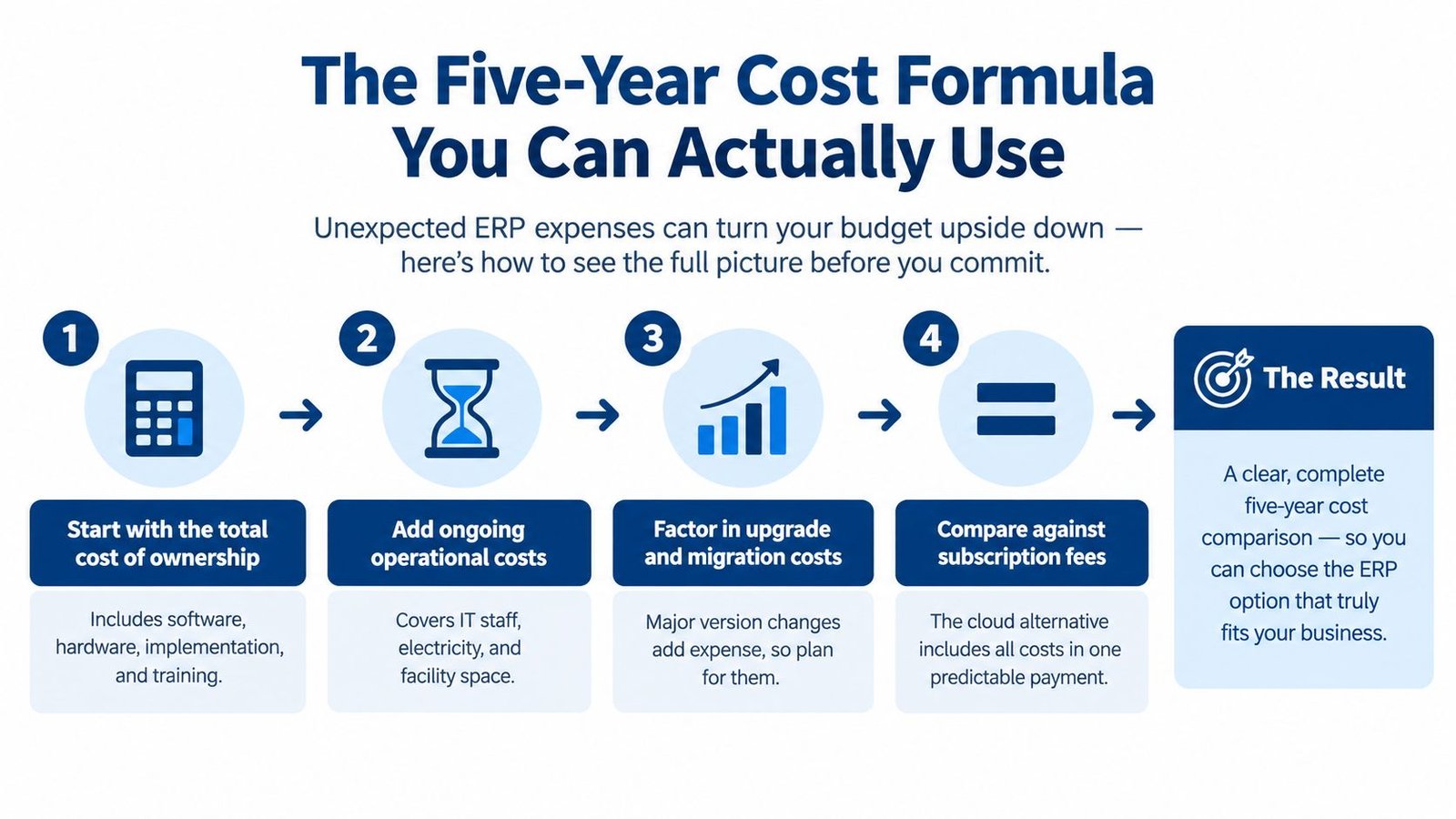
Subscription formula
Use this:
monthly subscription per user × number of users × 60 months
Then add any separate implementation, storage, transaction, integration, premium-support, or add-on charges the vendor will bill.
Self-hosted formula
Use this:
one-time licence cost + hosting over 60 months + the time or fee of whoever maintains it over 60 months + add-ons and integrations
If the self-hosted product is priced per user or per month, put that recurring piece into the same per-user-per-month × users × 60 formula. If it's a one-time licence, use the licence amount instead.
Then add migration, configuration, training, monitoring, backup storage, disaster-recovery testing, and renewal support when they apply.
A useful external reference on SaaS pricing traps is analysis of SaaS pricing pitfalls. The reason it matters here is simple, recurring software costs are easy to underestimate when you only look at year one.
Your own variables should be the only numbers in the model: user count, hosting quote, licence terms, expected technician hours, hourly rate, and add-on list. If a vendor refuses to give you a five-year total, they're selling month-one.
A Short Decision Guide for a Real Shop
A 25-person retailer doesn't need a white paper, it needs a straight answer in a meeting. Start with four questions.
- Can someone on your side set up hosting? If not, self-hosted ERP is a bad fit unless you use managed self-hosting.
- Do you want the vendor to run updates and backups? If yes, hosted subscription is the easier path.
- Do you prefer a monthly bill that scales with seats? If yes, cloud is the simpler financial shape.
- Do you have data residency, control, or compliance needs that push you toward your own server? If yes, self-hosted deserves a hard look.
A 25-person retailer with one generalist IT contact, two stores, and a controller who hates recurring licence creep will usually lean self-hosted if the business can handle basic hosting. The same retailer will lean cloud if nobody on staff can touch a server and the owner wants one vendor to own the maintenance burden.
That's where the managed self-hosted option earns its keep. It takes the hardest part of self-hosting, who patches at 2 a.m., and hands it back to the vendor without forcing you into a classic subscription model.
What This Comparison Does Not Do
It does not state prices, discounts, review scores, customer counts, sales figures, benchmarks, or case studies, because those aren't available here and I'm not going to invent them. It does not claim that self-hosted is always cheaper, or that cloud is always cheaper.
It also doesn't promise exact backup or support levels beyond what's been stated. UI Lib is not neutral, because it sells self-hosted software, and that matters when you read the trade-offs.
The formula above deliberately leaves your own numbers blank. That's the point. A real business case uses your user count, hosting quote, licence terms, expected technician hours, hourly rate, and add-on list, not a vendor's marketing number.
Questions Owners Ask Before They Sign
Who looks after updates
With self-hosted ERP, you do, or the technician you pay does. For products like Resto and Nexus, updates are applied by copying files and running migrations, and there is no automatic updater by design.
That is the owner's responsibility, not a side note. Some businesses like it because they can test changes before they go live. Others hate it because they don't want to own the release calendar.
Where does my data live
In a self-hosted setup, your data lives in your own database on your own hosting, so you control access and backups. That matters to owners who care about custody, auditability, or keeping business records on infrastructure they control.
Do I need a technical person
Yes, someone needs to be able to set up hosting, including a PHP version, a database, and a web server pointed at the /public folder. If that's not realistic, choose a hosted subscription or the managed self-hosted service.
When is a cloud ERP the better choice
Cloud ERP is the better choice when you have no technical staff, want the vendor to run updates, security, and backups, or need a vendor support contract. That's the simple answer, and it's usually the right one for a non-technical owner who values convenience over control.
If you want to compare actual self-hosted product options, look at Stocky POS & ERP and Nexus HR, CRM, and Project Management. The live demo is open, and the login details are not printed here. If you need a practical knowledge base for working through a rollout, Trupeer's knowledge base is a solid place to keep near the conversation.
UI Lib offers self-hosted business applications, managed self-hosting, and one-time licensed software for teams that want more control over their ERP stack. If you're weighing on premise vs cloud ERP and want to own the system instead of renting every seat forever, take a look at UI Lib and compare it against your own five-year numbers.