You’re probably paying for separate tools to store employee details, track leads, manage projects, record billable time, and send invoices. The trouble starts when a client changes their details in one place but not another, or when a completed task never makes it onto an invoice. Consolidating can reduce that friction, but only if the software connects the work behind the scenes, not just the screens.
Nexus is UI Lib’s own product, so this comparison also says plainly what it does not do.
| Option | Better choice when | Main trade-off |
|---|---|---|
| Separate specialist tools | You rely on a highly specialized workflow or want vendors to host and maintain your software | People, client records, and work details may need to be copied or reconciled across tools |
| A unified suite such as Nexus | Your HR, CRM, project tracking, and invoicing workflows overlap and you want to own the software, on your own hosting or hosted by UI Lib | The suite’s functional limits, such as no built-in country payroll tax rules or card payments |
| A hybrid stack | Most workflows fit together, but one area needs a specialist product | You keep an integration to manage, but avoid forcing a core process into the wrong tool |
Table of Contents
- What Unified Business Software Should and Should Not Mean
- The Real Cost of Separate HR, CRM, Projects and Invoicing Tools
- What to Check Before You Consolidate
- How Nexus Connects HR, CRM and Project Workflows
- When Separate Best-of-Breed Tools Are Still the Better Choice
- What Nexus Does Not Do
- Matching the Decision to Your Business
What Unified Business Software Should and Should Not Mean
Your morning might begin by checking a lead in the CRM, copying the client’s details into a project tool, confirming a team member’s availability in HR, and later rebuilding the project’s time entries as invoice lines. If someone updates a contact record in only one app, you may not notice until a quote or invoice goes to the wrong person. That’s not a lack of effort. It’s a consequence of keeping related work in separate places.
All in one business software should mean that related workflows use shared records and permissions, so a change made in one area can be used in another without re-entering it. For a services business, that might mean the same employee record supports HR and project assignment, while a client record connects a lead, a quote, a project, and an invoice. A common menu alone doesn’t prove any of that.
A shared menu is not the same as shared data
Some suites bundle separate applications under one account. That can simplify access, but it doesn’t necessarily connect the records. If a vendor says the product is unified, ask whether its modules share a database, identity system, and people or company records. Then test a real handoff: does a quote become an invoice, or does someone have to create the invoice again?
A useful comparison is Business Central benefits for growing companies, which helps frame what businesses should consider when they look at a broader business platform. The important question for your own purchase is still concrete: which repeated handoffs will disappear, and which will remain?
Consolidate workflows, not every tool by default
A unified platform shouldn’t force you to use every module. It should let you adopt the pieces that fit, while keeping shared records available where workflows meet. Nor should “all in one” imply that one product replaces specialist systems for every industry, country, or payment process.
Ask the vendor to demonstrate one real workflow from start to finish, using the same client or employee record at each step.
That definition gives you a fair test: a suite earns the label when it connects the records and handoffs your team depends on. If it only collects unrelated apps behind one login, it may reduce password juggling without fixing the work itself.
The Real Cost of Separate HR, CRM, Projects and Invoicing Tools
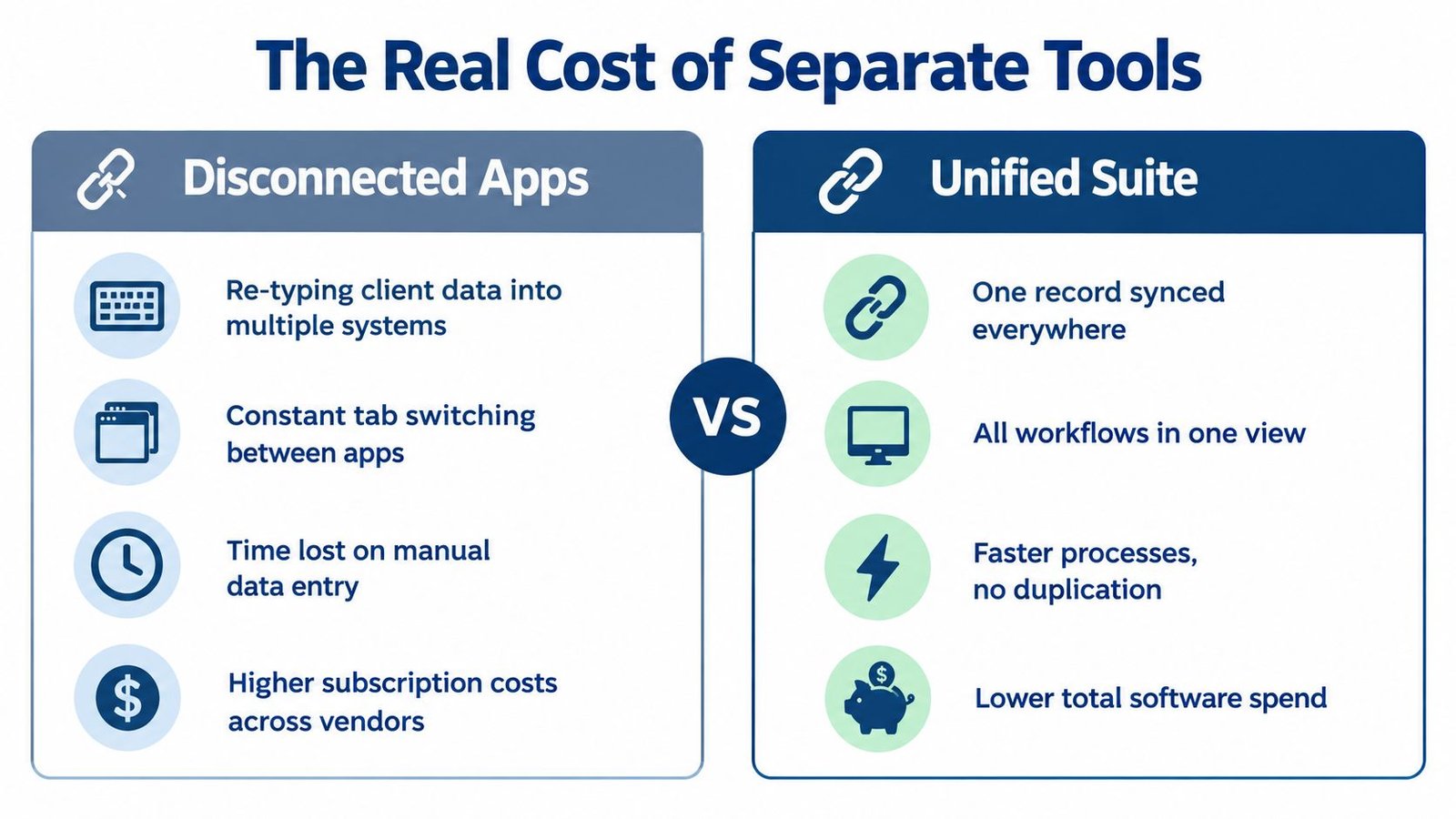
Separate subscriptions are only one part of the cost. The operational bill also includes the time your team spends typing the same client name, contact details, or project information into multiple systems, switching between tabs, and checking whether records still match.
The problem gets tangible when a project manager logs billable time in one app and the person preparing invoices works in another. Someone has to transfer those hours, decide which work belongs on the bill, and catch omissions before the invoice goes out. If that handoff is unreliable, the business can lose track of work it meant to charge for.
Look beyond the subscription line
Disconnected apps can also leave you with separate employee directories, client histories, permissions, and activity records. That makes simple questions harder to answer: who owns this deal, what work has been done for this client, and which invoice reflects the latest scope? The data may exist, but the team has to assemble it.
A unified suite can reduce duplicate entry where its records connect. It won’t automatically make every process faster or remove every reconciliation task. If your tools already exchange accurate data and your team rarely repeats work, moving everything may create migration effort without solving a meaningful problem.
Watch for these signs that fragmentation is already costing you:
- Repeated entry: The same client or employee details are maintained in multiple apps.
- Unclear handoffs: Staff ask which system holds the current version of a record.
- Invoice gaps: Billable time or approved work needs manual transfer before billing.
- Login friction: People regularly switch accounts just to follow one job from lead to delivery.
- Manual checking: Someone routinely reconciles records because the systems don’t stay aligned.
Count those tasks over a normal working week before you shop. You don’t need to invent a dollar estimate to see whether the work is worth reducing. If the repeated steps are rare, separate tools may be fine. If they happen on nearly every client job, a connected suite deserves a closer look.
What to Check Before You Consolidate
A migration can make a messy stack harder to manage if the new system traps your data or forces you into modules you don’t need. Before choosing a platform, ask vendors to show how you can leave, control access, adopt features gradually, connect other software, and run the application.
| Criterion | Question to Ask | Acceptable Signal |
|---|---|---|
| Data export | Can we export the records we need in a usable format? | The vendor explains what can be exported and demonstrates the process |
| Permissions | Can access differ by role and responsibility? | You can assign permissions that match how your staff work |
| Partial use | Can we start with selected modules? | Unused modules don’t have to become part of the daily workflow |
| API | Can we connect the records or actions we depend on? | Documentation describes the available endpoints and access controls |
| Hosting | Who runs the server and handles maintenance? | Responsibilities are explicit, and the operating model fits your team |
Test the exit before you enter
Ask for a practical export demonstration using the kinds of records you’ll migrate: employees, client contacts, opportunities, project tasks, time entries, and invoices. Don’t settle for “your data is yours.” Find out what is included, how related records are represented, and whether you can use the export outside the application.
Permissions deserve a similar test. A single login can make work feel connected, but staff shouldn’t automatically see every record just because the modules sit together. Ask how roles work across HR, sales, and projects, then verify that the access model fits your actual responsibilities.
Confirm the connections you need
An API matters if you plan to connect accounting, reporting, or other specialist tools. Check which records and actions are covered, how access is controlled, and whether the API is documented. For additional context on the way systems exchange accounting data, see this practical accounting software integration guide.
Hosting is a separate buying decision, not a minor technical detail. With self-hosted software the business owns the deployment, which does not mean running a server yourself: UI Lib’s managed hosting is $12 a month, with the software on our dedicated servers, installation free, regular backups and security looked after by our team, and you only buy a domain. Compare the hosting models with the options discussed in this guide to on-premise versus cloud ERP.
Don’t approve a consolidation based on a feature list. Require a walkthrough of your own records, permissions, integrations, and exit path.
How Nexus Connects HR, CRM and Project Workflows
Nexus brings HR, CRM, and project management into one Laravel application, one database, and one login. The practical difference is that its shared people directory can connect an employee’s HR record with their CRM ownership and project assignments, rather than treating each appearance of that person as an unrelated entry.
Follow a person from hiring to project work
The HR module covers employee records, departments, an org chart, onboarding, attendance, leave, payroll runs, and performance reviews. Recruitment starts with a careers page that feeds a candidate board. When a candidate is hired, the process creates an employee record, linking recruitment to the HR directory instead of requiring the team to start over with a second profile.
That connection is useful when the same team member appears in operational workflows. The person who requests leave is still represented as the employee assigned to work, so the business can use a common people record across HR, CRM, and projects.
Carry client work into delivery and billing
Nexus CRM includes sales pipelines, quotes that become invoices, contracts, and support tickets. Projects include tasks and a timer, with billable hours able to become invoices. A client portal gives clients a place to engage with the business through the system.
The details matter. A new pipeline starts with six stages, from New at 10% to Won at 100% and Lost at 0%, and the forecast is each open deal’s value multiplied by its stage probability. Converting a lead creates the contact, optionally the company, and a deal in one step, and keeps the lead’s source and campaign. An accepted quote converts into a draft invoice with its lines, discount and tax intact, and an unpaid invoice past its due date shows as overdue without anyone marking it.
The value isn’t having these labels in a menu. It’s whether the handoffs match how your business sells and delivers work. If your team tracks time against projects and bills those hours, the timer-to-invoice path is directly relevant. If your accounting process depends on another system, test the records and API connections you’ll need before replacing anything.
For a useful way to think through those handoffs, this guide on how to connect your ERP to Resolut offers additional integration context. Nexus also provides a versioned REST API with scoped bearer tokens covering employees, leads, deals, invoices, tickets, projects, tasks, and time entries.
Nexus supports eight complete languages, including Arabic with a right-to-left layout, and includes a built-in translation editor. You can use only the parts that fit your business; shared data doesn’t mean you must turn every module into a required workflow.
See the product in motion:
The buying terms are straightforward: one-time purchase, see the product page for the current price. Nexus has no per-user fee. Its product page and download page are the places to review the current offer and details.
When Separate Best-of-Breed Tools Are Still the Better Choice
Don’t consolidate just to make your software list shorter. Keep specialist tools when one part of your business depends on features a general suite doesn’t provide.
Country-specific payroll is a clear example. If your staff rely on built-in local tax calculations, a system that asks you to configure deduction components using your own rates may not meet the need. The same applies if your workflow relies on a specialized client service, industry process, or payment capability that the suite doesn’t provide. Replacing a strong specialist tool with an approximate substitute can create more work and risk than maintaining an integration.
Hosting does not have to rule Nexus out, because UI Lib’s managed hosting runs the server for you. What can rule it out is a missing capability, such as local payroll tax rules or card collection, so judge the software by what your team needs it to do.
A hybrid stack is a valid answer
You don’t have to choose between keeping every app and replacing everything. A connected core can handle employee records, CRM, projects, and invoicing, while a specialist product remains in place for a workflow that needs deeper capabilities. The trade-off is an integration to test and maintain, but it can be better than forcing an unsuitable module into daily use.
Read a comparison of CRM and project management software as you decide whether your needs fit a combined workflow or call for separate tools. Focus on the work your team repeats, not how many boxes a vendor can check.
If you’re already satisfied with how your systems exchange data, your team doesn’t re-enter much information, and billing handoffs work, fragmentation may not be a problem worth fixing. Consolidation is a tool choice, not a goal in itself.
What Nexus Does Not Do
Nexus has real boundaries. Check each one against your existing process before treating it as a replacement for the systems you already use.
- It doesn’t calculate country-specific payroll taxes. Nexus has payroll runs, but payroll taxes and contributions must be set up as deduction components using your own rates. There are no built-in country tax rules, so retain a specialist payroll system or verify that your internal process can handle the calculations correctly.
- It doesn’t process card payments. If your clients pay by card through your current software, you’ll need to keep that service or confirm a suitable connection. Don’t assume an invoice workflow includes payment collection.
- Updates are applied by copying files and running migrations. There is no automatic updater. Managed hosting covers the server, regular backups and security, and you can ask us how updates are handled for your install.
- Recurring invoices are issued by pressing a button on the invoice list, because Nexus needs no cron. Each press advances a recurring invoice by one period.
Decide what can stay outside
These limits don’t automatically rule Nexus out. They do mean you should separate the workflows it can bring together from the services it doesn’t provide. A services firm might use Nexus for HR, CRM, project tracking, and invoicing while keeping payment collection or regulated payroll in a dedicated system.
If your business also needs retail point-of-sale and inventory workflows, compare those needs separately rather than assuming an HR and CRM suite covers them. UI Lib’s Stocky POS and ERP information describes a different product category for those operational requirements.
Write down who will handle payroll calculations and card collection before you switch. If either responsibility has no clear owner, the gap is operational, not just a missing feature.
Matching the Decision to Your Business
If you run a small services business and pay for separate HR, CRM, project, and invoicing tools, a unified suite such as Nexus is a sensible candidate. Test your actual employee-to-project and quote-to-invoice workflows before migrating.
If your work depends on built-in country payroll calculations or card processing, keep the relevant specialist tools or use a hybrid stack. If you’re not ready to host software, managed hosting is $12 a month and the only thing you buy is a domain. If you’d rather use your own hosting, we can do the installation for a one-time $50.
Review Nexus’s product details, then use the live demo to inspect the workflows; the demo’s own login page lists the accounts to use. Choose consolidation when it removes real handoffs without creating work your team can’t absorb.
UI Lib develops self-hosted business applications, including Nexus for HR, CRM, sales, and project management. Visit UI Lib to review the product details and live demo, then compare its workflows with the tools your team uses today.