A closing manager is trying to finish payroll while a server's clock-out is missing and another employee's leave request is still waiting for approval. The schedule, attendance record, and pay run may sit in different places, so the manager has to chase details and re-enter information before the deadline.
Restaurant workforce management software brings those connected staff tasks into a shared workflow. Its value isn't any single clock, schedule, or payroll screen. It's whether employee records, hours, leave, tips, and pay information stay consistent from the start of a shift through payroll review.
Table of Contents
- What Restaurant Workforce Management Software Is
- The Daily Reality of Staff Management in a Restaurant
- Must-Have Features for Restaurant Workforce Management
- Self-Hosted vs SaaS Deployment Models
- How Resto Covers Clock-In Through Payroll
- What Resto Does Not Do
- A Practical Checklist for Choosing Your Software
What Restaurant Workforce Management Software Is
Workforce management in a restaurant means coordinating the work-related information that managers need to run shifts and pay staff. That can include employee records and roles, clock-in and clock-out, timesheets, leave, shift scheduling, overtime, tips, and payroll. A time clock records attendance. A scheduler organizes shifts. A broader workforce platform connects those records so a manager doesn't have to rebuild the same information in separate tools.
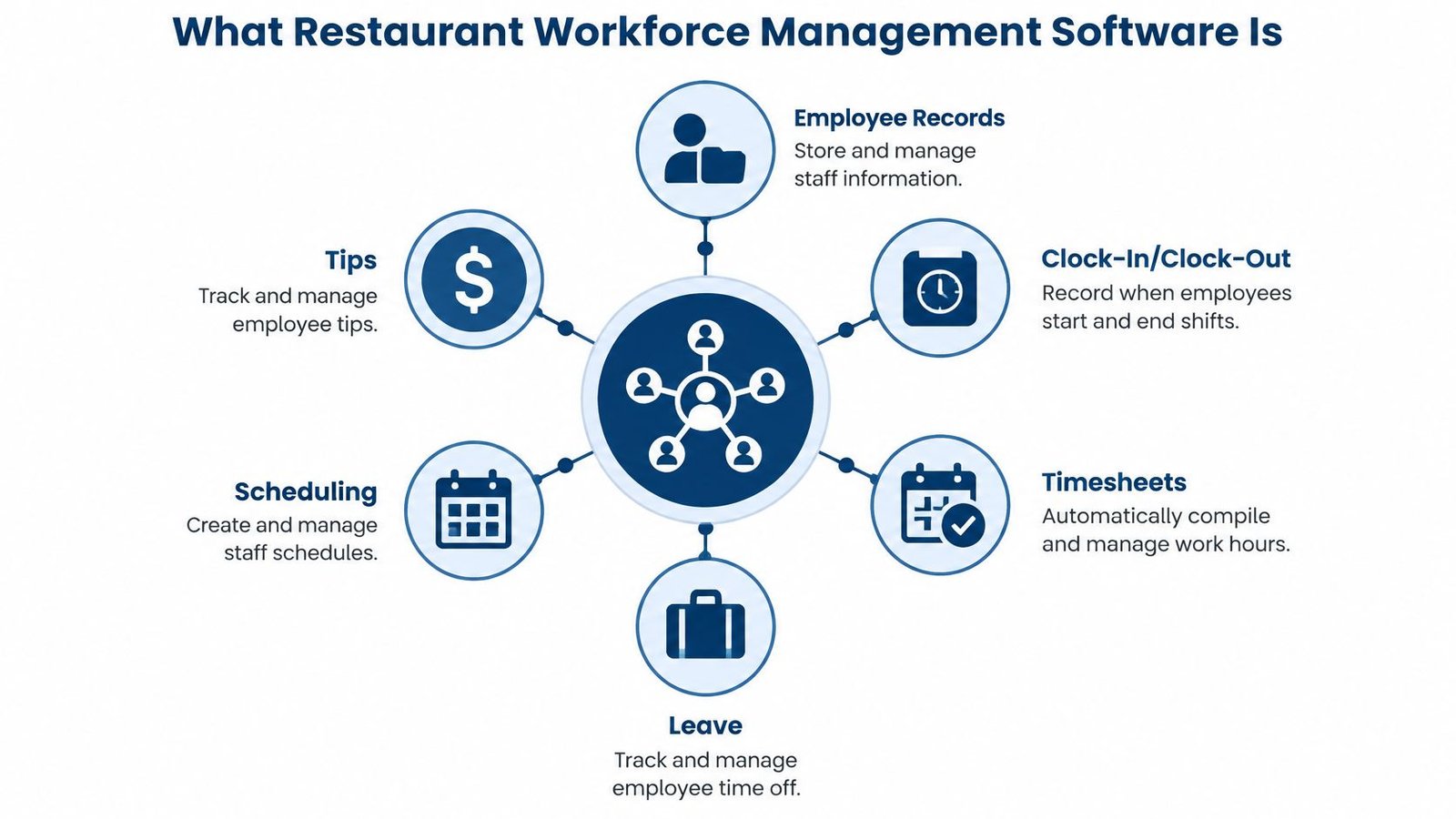
The difference matters at a busy restaurant. If a staff member clocks in under one system, records a leave request in another, and receives pay through a third, a manager may have to check all three before resolving a timesheet discrepancy. A connected system can give managers one place to review the relevant information, though the quality of the workflow still depends on accurate records and sensible approval practices.
Restaurant staffing also changes with the rhythm of service. A lunch shift, a dinner rush, and a quiet period need different coverage by role. In a mature workforce process, the manager plans staffing against expected demand, records what happened, compares scheduled and worked hours, and uses that information to inform later decisions. That is a closed loop, not a digital version of a paper schedule.
For a wider explanation of how workforce systems connect HR processes, attendance, and pay, see this Safety Space workforce management overview. The same principle applies in restaurants: separate tools can each do a job, but a connected workflow can reduce repetitive handling and make it easier to review what happened.
The workforce layer also sits alongside the restaurant's other operating systems. A point-of-sale system records transactions, while the workforce system tracks who worked and when. Understanding how restaurant POS software fits into daily operations helps clarify where those records may need to meet, especially when managers want to compare staffing with sales.
The Daily Reality of Staff Management in a Restaurant
A dinner shift can start with one employee calling out and end with a manager correcting a timecard. In restaurants, staffing changes are part of routine operations. In limited-service restaurants in the United States, hourly-employee turnover reached 135% in the third quarter of 2024, while management turnover was 55%, up from 45% in 2019, according to research on restaurant labor trends. The hourly figure means annual separations exceeded the segment's average hourly workforce. Recruiting, onboarding, updating availability, and communicating schedule changes can therefore become recurring tasks.
Every departure or new hire affects the records managers rely on. If availability and role details fall out of date, a schedule may assign a shift to someone who cannot work it, or leave a coverage gap unnoticed. A workforce system can keep those details organized, but managers still need to update and review them.
Staffing pressure starts before the schedule is written. The same restaurant labor research found that 77% of restaurant operators considered recruiting and retaining employees a significant challenge, and 32% said they lacked enough workers to support existing demand. Software cannot fill an empty role. It can help managers see current availability and shift coverage as the team changes.
Keep staff records and availability current throughout the week, not just when payroll is due.
Labor costs bring a separate pressure. A 2025 restaurant labor cost survey and playbook from 7shifts found that only 36% of restaurants reached their labor-cost targets, while 44% spent more than planned. About 40% reported labor costs between 20% and 25% of revenue, 26% reported 26% to 30%, and about 15% exceeded 30%. 7shifts sells scheduling software, so read the figures as one vendor's survey. Even a small mismatch between the people scheduled and the work required can affect the shift's costs.
Service conditions help explain those mismatches. A rush of orders can create pressure in the kitchen while the dining room appears quiet; understanding how kitchen display system software supports order flow can help operators connect service activity with staffing needs. Employee self-service can also reduce routine requests to managers. This guide to HR portal implementation covers ways to organize employee information and requests.
Must-Have Features for Restaurant Workforce Management
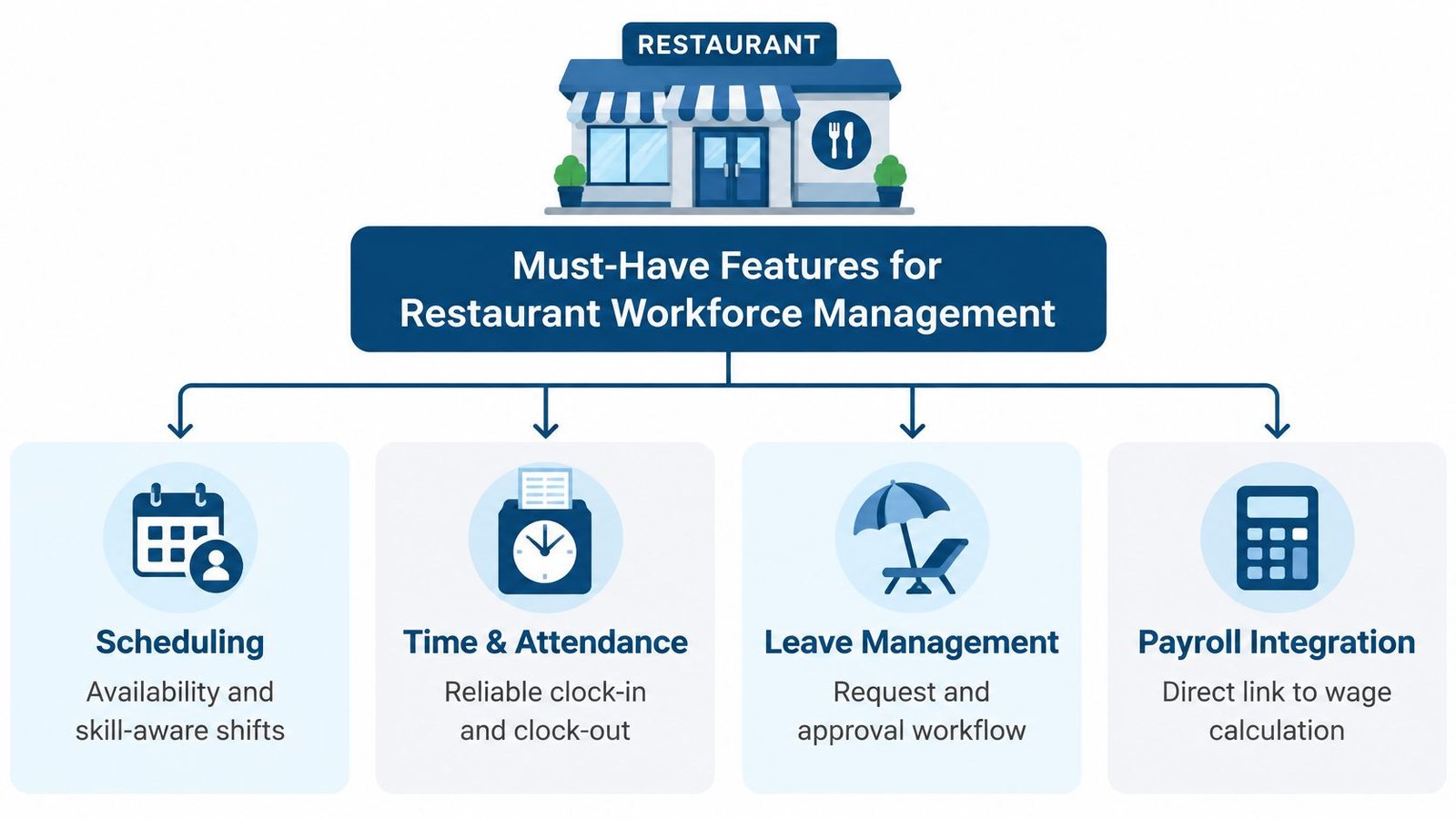
A workforce platform should make it possible to answer basic operating questions: Who was expected to work? Who worked? Was the right role covered? Did the hours and tips reach payroll accurately? When assessing software, look for connected records and clear review steps, rather than assuming that a long feature list means the work is handled automatically.
Start with scheduling and demand
A useful schedule should reflect the expected work, not just repeat last week's pattern. Ask whether the system can account for availability, employee skills, preferences, and shift limits. Also ask whether it can use sales information at a useful level of detail. Daily totals can hide a quiet stretch followed by a sharp rush; period-by-period sales and role coverage offer a more practical basis for staffing decisions.
A 2025 study using operational data from a dining-restaurant chain tested a two-stage integer-programming model. It first set staffing requirements by day and starting period, then assigned employees to tasks based on skills and preferences. The model reduced labor costs by 12.3% versus manual scheduling, while improving service and labor satisfaction, as described in the restaurant scheduling optimization study. That result is specific to the tested model and setting, not a promise that every restaurant will achieve the same outcome.
Ask a vendor: Can the system distinguish forecast accuracy from schedule quality? A schedule may follow its rules and still miss the mark if the sales forecast is wrong. Useful views should make it possible to compare expected demand, planned hours, and required versus assigned coverage.
Check attendance, leave, and payroll handoffs
Reliable clock-in and clock-out records underpin timesheets. Managers should be able to review corrections, approve hours, and see how leave entries affect the record. Ask how an employee's role is represented, and whether the system keeps attendance and payroll information connected without hiding the original hours.
Tip allocation and overtime need careful handling too. Ask whether payroll workflows can show how the figures were calculated and let a manager review them before a run is finalized. Software can help organize records, but an employer remains responsible for checking its settings and practices.
For more practical context on evaluating scheduling tools, watch this overview:
Self-Hosted vs SaaS Deployment Models
The deployment model affects who operates the software and where its data is held. With self-hosted software, the business installs the application on infrastructure it controls. With SaaS, the provider hosts the application and the customer accesses it as a service. The right choice depends on more than the first invoice: consider ongoing costs, data custody, maintenance, and the technical capacity available to the restaurant.
| Factor | Self-Hosted | SaaS |
|---|---|---|
| Cost model | May use a one-time purchase, with no per-terminal or per-seat fee if the product is offered on those terms | Commonly subscription-based; check the vendor's current pricing and contract |
| Data custody | Records stay on infrastructure the operator controls | The provider hosts the application and its data |
| Maintenance responsibility | The operator manages hosting and applies updates, or hands the server work to a provider | The vendor manages the hosted service and deployment |
| Scalability | Depends on the operator's hosting and setup | Depends on the provider's plans and service |
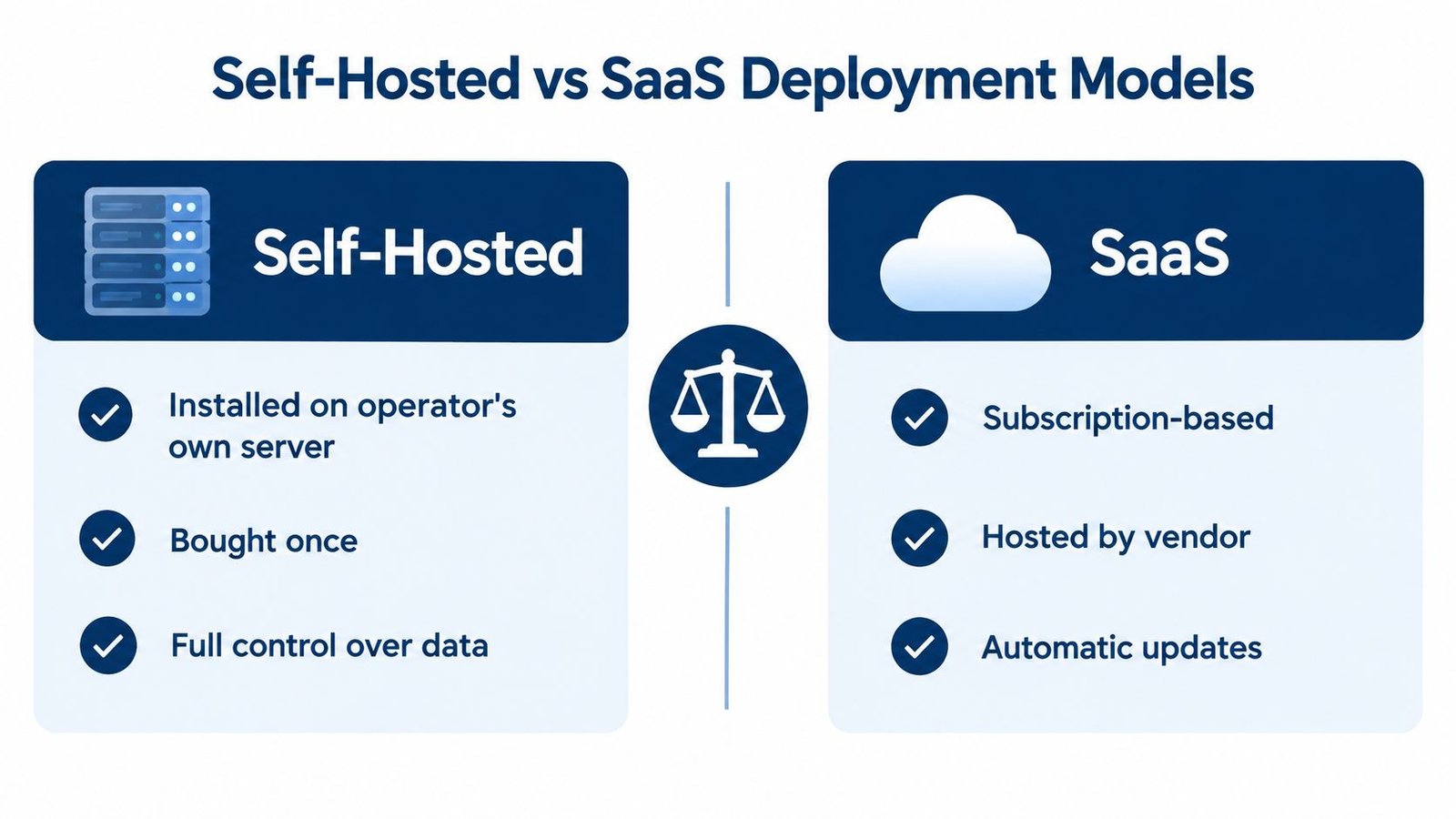
Self-hosting can suit an operator who values control over business records and wants to avoid recurring per-user or per-terminal charges, when the product's terms support that model. The hosting, backups and server upkeep still need an owner and a reliable process, and that owner does not have to be you: UI Lib's managed hosting is $12 a month, with Resto on UI Lib's dedicated servers, the server managed for you and installation free, so you only buy a domain. If you would rather use your own hosting, the installation service is a one-time $50. A one-time licence doesn't mean there are no ongoing costs, but they are small and known.
SaaS is often a better fit for owners who want the vendor to run everything under a recurring service contract. The trade-off is that the data is held on the provider's infrastructure. Neither model automatically guarantees that a business's policies or regulatory obligations are met. Operators should verify how each option handles access, records, support, and changes.
For a broader comparison of deployment choices, this guide to on-premise versus cloud ERP explains the general trade-offs in data control and administration. Use it as context, then evaluate the actual terms and technical requirements of the workforce product you're considering.
How Resto Covers Clock-In Through Payroll
Consider a server arriving for a shift. With Resto, the employee clocks in using a PIN, and the system records the clock-in and timesheet. Managers can also work with leave records and payroll runs, which support overtime, commission, and tip sharing. This puts attendance and pay-related information in the same restaurant system, though managers still need to review records and resolve discrepancies.
The workforce features sit alongside restaurant operations. Resto's touch-first till supports tables, modifiers, combos, split and partial payments, tips, and line-level refunds. If the server enters an order, the kitchen display can route it by station; staff can bump and recall orders, and late orders use colour indicators. A drag-and-drop floor plan shows live table status, with a phone-sized waiter app for service.
Inventory and fulfillment also connect to the wider picture. Recipes and sub-recipes deduct stock automatically, with moving-average costing, batch and expiry tracking, and a menu-engineering matrix organized as Stars, Ploughhorses, Puzzles, and Dogs. The system also includes QR menu ordering, an online store, delivery zones with fees and times, a rider dispatch board, a reservations day book, a waitlist, and online reservation requests. It supports several branches, each with its own stock, tables, staff, prices, and taxes.
That breadth can be useful when an operator wants sales, inventory, and staff hours in one application instead of stitching together separate records. It doesn't mean every workforce decision is automated. Resto's described scheduling functionality is limited to shifts, so managers shouldn't assume it will forecast demand or build skill-aware schedules.
Resto is self-hosted and sold as a one-time purchase, with no per-terminal or per-seat fees. For current pricing, see the Resto product page. The application requires PHP 8.3 and MySQL 8.0 or MariaDB 10.6. It doesn't require Node, Redis, WebSockets, queue workers, or cron. It supports Arabic with a right-to-left layout, and includes eight roles with route-level permissions.
What Resto Does Not Do
Resto's limits matter as much as its feature set. It has no automatic updater: updates are copied in, and database migrations are run manually. That means the operator or a technical service provider needs a process for applying updates and managing the deployment.
The kitchen display updates by polling, not by WebSockets. Payment options are Stripe Checkout, cash on delivery, and pay at the counter. No third-party delivery platform integrations are documented, so an operator who depends on those connections should confirm their requirements before choosing the system.
Resto was released in August 2026, so there isn't a published track record to cite. Treat it as a new product and assess it through its available demonstration and technical materials rather than assuming years of operating history. The available product information also doesn't document staff scheduling beyond shifts, country-specific payroll tax rules, or built-in labour-law compliance.
That last point is important. In the United States, the Fair Labor Standards Act requires overtime pay of at least 1.5 times an employee's regular rate for hours worked above 40 in a workweek, as explained in the Department of Labor's restaurant fact sheet. A payroll feature doesn't, by itself, prove that a configuration follows the rules that apply to a particular employer. Managers must verify the relevant jurisdictional requirements and check that their settings, records, and approvals match them.
Tips also require attention beyond entering amounts into a system. The IRS explains that employees must report tips to employers, while employers have withholding responsibilities for reported tips; its restaurant tip-income guidance describes these obligations. Resto's tip-sharing and payroll-run features can support recordkeeping, but they aren't a guarantee of tax compliance.
A Practical Checklist for Choosing Your Software
A busy Friday exposes gaps that a product demo may hide. Follow one employee's record from hiring through clock-in, leave, timesheet approval, tip allocation, and payroll. Check where information transfers between systems, who corrects errors, and how managers can review those changes.
Scheduling and forecasting
- Demand detail: Can forecasts account for sales by service period, role, station, or ordering channel, rather than relying only on daily totals?
- Coverage logic: Can managers compare required staffing with assigned shifts and see whether a shortfall comes from the forecast or the schedule?
- Employee fit: Are staff skills and availability stored in searchable fields, or buried in free-text notes?
- Change control: Can managers record schedule overrides and check them against the restaurant's notice and approval practices?
Scheduling tools also serve other settings with fixed time slots. This resource on how to compare class scheduling options offers another perspective on matching people to shifts.
Time and attendance
- Complete records: Can managers review clock-ins, clock-outs, timesheets, leave, and corrections together?
- Clear accountability: Do permissions fit each role, and can managers see who changed or approved a record?
- Operational fit: Does the system work with the restaurant's devices, internet connection, and shift routines?
Payroll and compliance
- Pay inputs: Before payroll runs, can managers review hours, overtime, commissions, and tip-sharing records?
- Rules and responsibility: Which legal and tax rules does the system document, and which must the employer confirm?
- Total ownership cost: What will licensing, hosting, updates, support, and administration cost over time?
Labor targets can be difficult to meet, as the figures discussed earlier in this guide show. For the full breakdown, see the restaurant labor cost survey.
Before signing, run one pay period end to end in a demonstration using your restaurant's shift patterns. Record each manual correction, missing approval, and data transfer a manager must handle. Those steps reveal whether the system fits the work behind payroll, not just the features shown on screen.
UI Lib develops self-hosted business applications, including Resto for restaurant sales, service, inventory, and staff workflows. Visit UI Lib to review the product information and demonstration, then compare its deployment and workforce capabilities with the needs of your restaurant.