
A client asks for another revision. Your designer adds it to the project board, your developer logs the work elsewhere, and your account manager promises a delivery date in email. When it's time to invoice, you're left working out what was approved, what was included in the quote, and what should be billed.
Agency management software should connect those decisions, not put more screens in front of your team. For a small design, development, marketing, or IT services business, the useful question isn't how many features a product has. It's whether you can follow a client engagement from the first conversation to the final invoice without reconstructing the story yourself.
Table of Contents
- The Agency Workflow That Software Must Support
- What Agency Management Software Actually Does
- The Cost of Spreading Agency Work Across Tools
- How to Evaluate the Key Modules and Workflows
- Choosing Between SaaS and Self-Hosted Software
- How Nexus Connects the Deal to the Invoice
- Implementation Patterns for Agencies and SMBs
- Limits, Alternatives, and the Right Time to Choose
The Agency Workflow That Software Must Support
Consider a hypothetical website redesign. The client's initial request becomes a proposal, the accepted proposal becomes delivery work, and the team records what it does. Client feedback then changes tasks, while an account manager decides whether each revision belongs within the agreed scope.
That engagement has a delivery side and a business side. The designer needs clear instructions; the owner needs to know whether the agency is still delivering what it sold. Both need access to the same underlying agreement.
The workflow below shows the main handoffs.
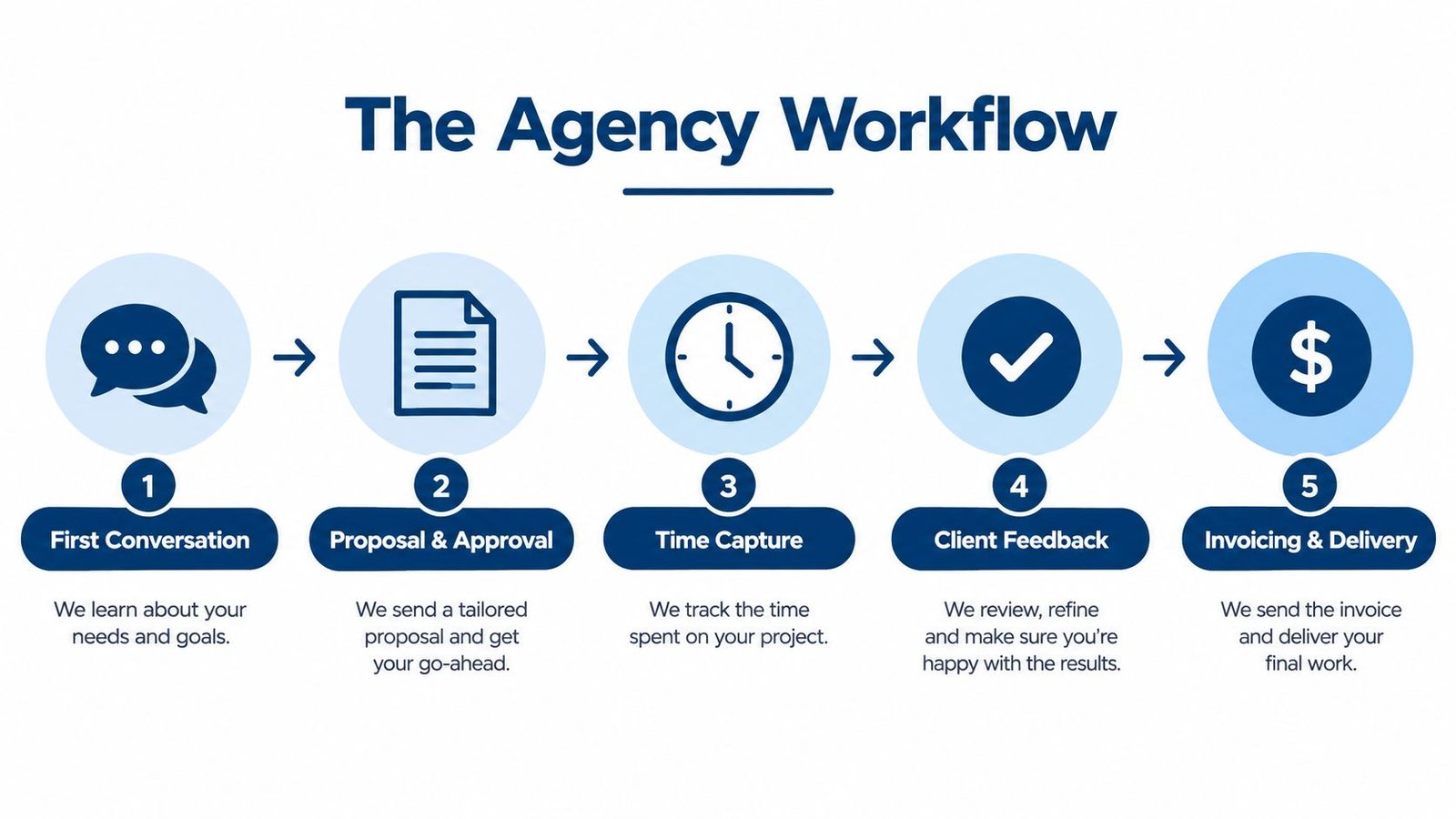
Manage the engagement, not just the task
The category's core functions typically coordinate clients, projects, resources, finances, documents, and performance data across an agency, rather than serving a single department, as described in this agency-management-software market overview. That breadth matters because a completed task doesn't necessarily mean approved, billable, or invoiced work.
For the redesign, an owner should be able to establish:
- What was agreed: The accepted scope, deliverables, and commercial terms.
- What changed: The client's additional request and the decision about its treatment.
- What happened: Who performed the work, what they recorded, and whether it was reviewed.
- What remains: Outstanding feedback, unfinished delivery, unapproved entries, or unpaid invoices.
Keep handoffs lightweight
A connected system shouldn't require everyone to become an administrator. The person doing the work needs a practical way to record it, while the person approving it needs enough context to make a decision.
Practical rule: Every handoff should make the next person's job clearer without asking them to recreate information someone already entered.
Follow-up belongs in this operating picture too. A support request after delivery may be a correction, a new assignment, or a question about the original work. Keeping that distinction visible helps the owner make a deliberate decision instead of letting new work disappear into an old project.
What Agency Management Software Actually Does
Think of agency management software as a connected operating system for client work. Its modules serve different jobs, but their value depends on whether people can move between those jobs without losing context. Products vary, so a category label isn't proof that every capability is included.
The main functions fit together like this.
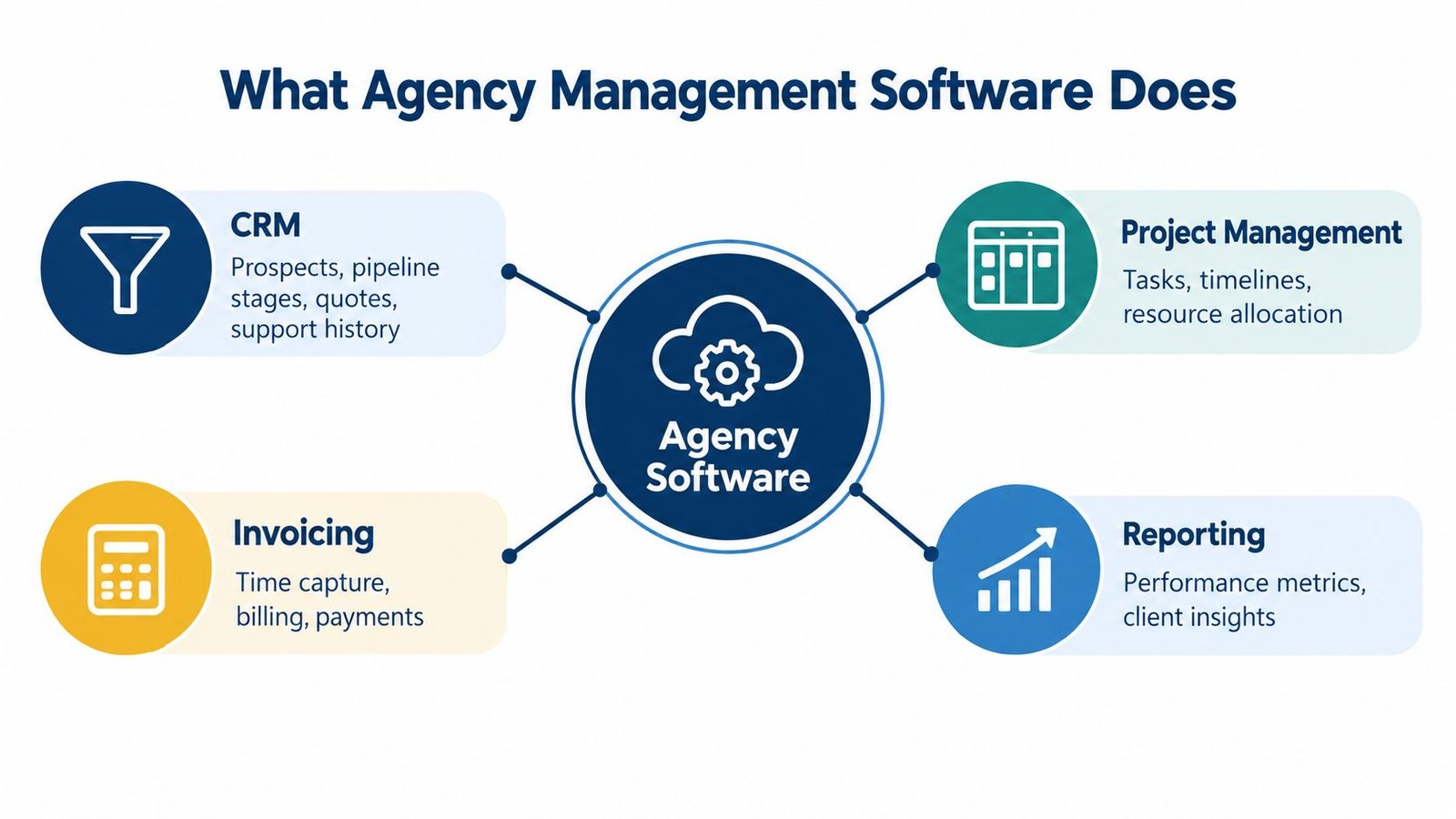
From client information to delivery
Customer relationship management, or CRM, organizes the commercial relationship. For an agency, that means understanding prospects, pipeline stages, quotes, and relevant support history. It answers what the client might buy and what the agency has already discussed.
Project management organizes the work required to deliver the engagement. Tasks explain responsibilities, dependencies express what must happen before something else can proceed, and different views help people inspect progress.
For a hypothetical consultancy assignment, the account manager might review the commercial opportunity while the delivery lead checks whether discovery must finish before implementation begins. Those are different decisions about the same engagement.
From recorded work to business decisions
Other capabilities address the practical questions that arise during delivery:
| Function | Question it should help answer |
|---|---|
| Time and expenses | What work and costs belong to this engagement? |
| Approvals | Which entries or requests have been reviewed? |
| Billing | What approved work is ready to charge? |
| Resource scheduling | Who can reasonably take on the work? |
| Reporting | How does delivery compare with the original plan? |
| Internal administration | Who is available, responsible, and permitted to act? |
Billing isn't the same as payment processing, and a task board isn't the same as resource scheduling. Treat these as distinct capabilities when reviewing a product rather than assuming one includes the other.
For another way to organize your requirements, WebinOne's agency management platform guide can accompany your own workflow map. Use it as a comparison resource, not a substitute for testing how your agency's records move.
The deciding factor is workflow mechanics, not module count. A broad application that leaves staff copying approved work into invoices may solve less of your problem than a narrower system with a reliable handoff.
The Cost of Spreading Agency Work Across Tools
Separate tools aren't automatically a mistake. A specialist application may suit a team's work particularly well, and replacing it could create more disruption than value. The problem begins when employees must act as the connection between systems.
One published analysis reports that small and midsize businesses use an average of 16 software tools, with 28% integrated, and estimates 15 hours per week spent on manual entry and context switching, alongside approximately $4,200 annually in integration costs (Liaison's tool-sprawl analysis). These are published estimates, not a forecast of your agency's costs or potential savings.
Find the work between applications
For an agency, fragmentation can look deceptively ordinary. Someone copies a client's billing details into accounting, translates project names between systems, and checks whether a time entry has already been charged.
Include these activities when assessing your current setup:
- Re-entry: Copying client details, quoted work, expenses, or approved hours.
- Reconciliation: Resolving differences between project records and billing records.
- Access administration: Maintaining separate accounts and removing access when responsibilities change.
- Exception handling: Investigating missing approvals, inconsistent rates, or unclear invoice status.
The guide to all-in-one business software offers a broader consolidation perspective. For agency owners, the practical test is whether consolidation removes a costly handoff without sacrificing a capability the team needs.
Measure your own administrative burden
Ask the people doing this work to record the repeated actions they perform during a normal billing cycle. Note who performs them, how long they take, and which mistakes require someone else's attention.
Then compare the proposed replacement against that baseline, including migration, training, integration maintenance, and hosting where relevant.
A shared database won't resolve a disagreement about what counts as billable work. Agree on the business rule before automating it.
That distinction protects project margin more effectively than a vague promise of efficiency. Software can preserve a decision and carry it forward, but the owner still needs to define who makes that decision.
How to Evaluate the Key Modules and Workflows
Ask a supplier to demonstrate a representative engagement, including an exception such as a rejected expense or changed quote. A polished dashboard tells you little about whether the underlying records remain accurate when something changes.
Use the following framework to keep the review focused.
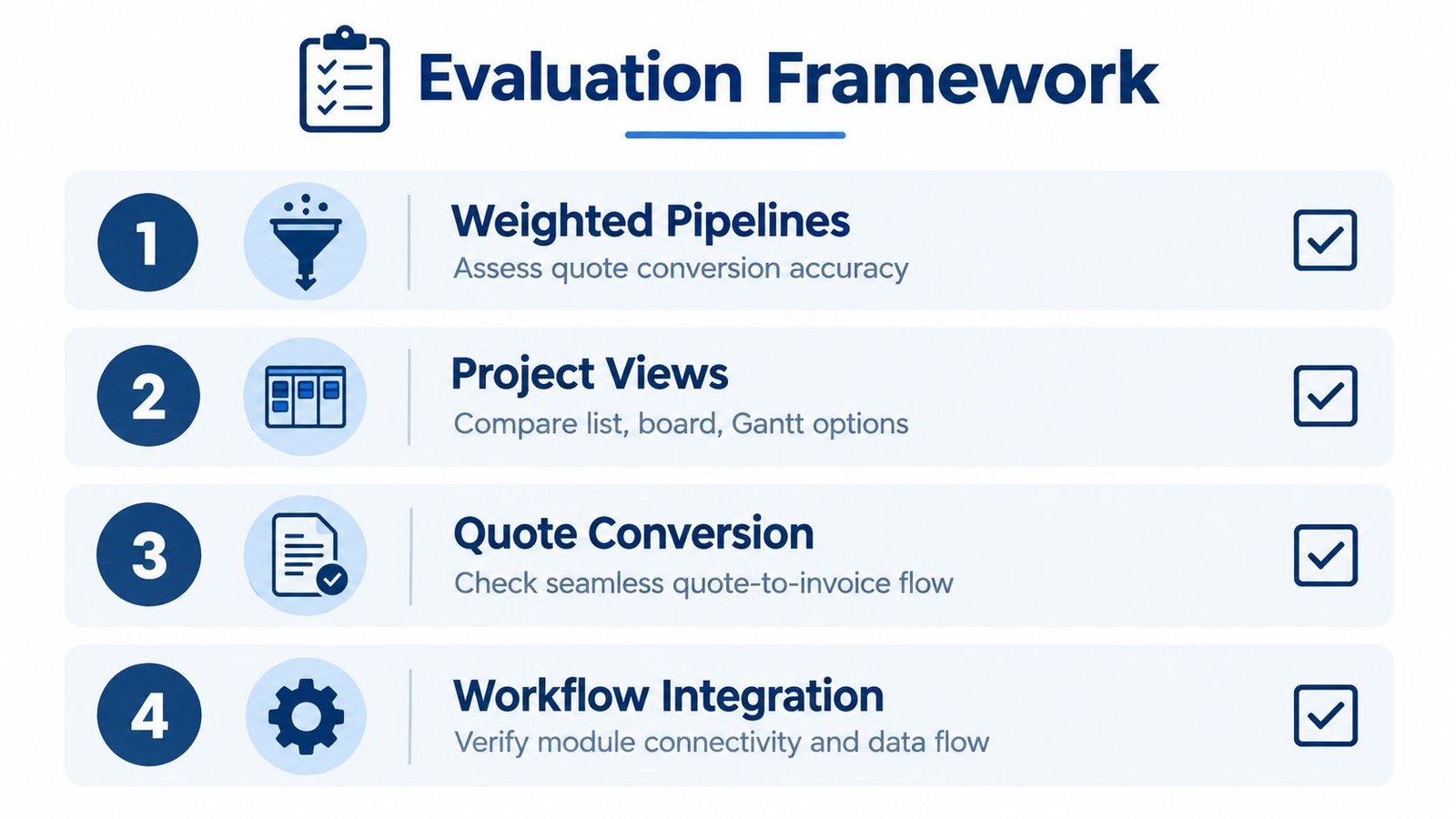
Inspect the commercial and delivery mechanics
Start with pipeline weighting. Ask how the system represents deal status and likelihood, and make sure nobody mistakes a weighted opportunity for committed revenue. Then inspect quote conversion: do line items, discounts, and tax treatment survive the move into an invoice?
For project work, ask to see the same assignment in list, board, Gantt, and calendar views where those options are offered. Check whether changing a task updates the underlying record rather than creating another version to maintain.
Useful verification questions include:
- Dependencies: Does the application enforce the intended sequence or merely draw connections?
- Time capture: Can a person record work against the correct task without a separate reconstruction exercise?
- Approval queues: Who reviews leave, timesheets, and expenses, and how are rejected entries handled?
- Client access: What can a client see, and what remains internal?
- Permissions: How do viewer, member, and manager rights differ on a project?
- API access: Can an integration receive narrowly scoped access instead of broad administrative credentials?
The CRM and project management software guide provides further context for evaluating the commercial-to-delivery connection.
Ask reporting questions before accepting dashboard answers
To assess profitability, look for a way to reconcile estimated, actual, and invoiced work by project phase. A profitable engagement overall can conceal excessive revision costs or a loss-making discovery phase; the reporting approach described in Synergist's agency management intelligence guide addresses that distinction.
Ask which records support each report. Can you compare quoted work, logged hours, employee costs, expenses, and invoiced amounts? If a report depends on data the agency doesn't collect, the dashboard won't solve that gap.
Also settle what “available time” means before comparing utilization across people. Leave, management responsibilities, sales activity, training, and rework need consistent treatment if the owner wants a fair comparison.
Finally, agree on an escalation rule. A project manager should know when an unexpected revision requires an owner's decision, rather than discovering the overrun during invoice preparation. Visibility only helps when someone has responsibility to act on it.
Choosing Between SaaS and Self-Hosted Software
Choose deployment based on who will operate the application reliably. Software as a service, or SaaS, generally suits an owner who wants a provider to run the application and infrastructure. Self-hosting suits a business that wants control over its installation and can arrange the operational work that comes with it.
Self-hosting can improve control over business data, but it transfers operational and compliance responsibilities to the organization running the system, as discussed in this analysis of data sovereignty and cloud compliance. Control isn't the same thing as protection.
| Decision area | Hosted service | Self-hosted application |
|---|---|---|
| Infrastructure | Confirm what the provider operates | Arrange suitable hosting and maintenance |
| Updates | Verify the provider's update policy | Assign responsibility for applying releases |
| Backups | Check retention and recovery arrangements | Establish and test your recovery process |
| Administration | Review contractual responsibilities | Identify your internal or external operator |
| Cost review | Include subscriptions and required extras | Include licensing, hosting, and technical work |
Separate deployment from tenancy
Single-tenant and multi-tenant describe a different architectural choice. A single-tenant installation suits an agency operating its own workspace. A multi-tenant edition is intended for a business operating separate customer workspaces under centralized administration.
Don't choose a multi-tenant edition merely because your agency serves many clients. Client portal access within your agency's operation isn't the same requirement as running separate subscription workspaces for other businesses.
The comparison of on-premise and cloud ERP offers a broader perspective on ownership and operational responsibility. Apply the same questions to agency software without assuming that either model is cheaper or safer.
Decide who will answer when something breaks
Before choosing self-hosting, name the person or service responsible for patching, monitoring, access reviews, backups, and incident response. Ask how the agency would recover if the application or hosting became unavailable.
For a hosted service, inspect the provider's commitments rather than assuming everything is covered. You still need sensible permissions, clear internal ownership, and an understanding of how to retrieve business records.
A hosted tool is the better operational fit when nobody can reliably own the self-hosted responsibilities. That's a capacity decision, not a judgment about the agency's technical sophistication.
How Nexus Connects the Deal to the Invoice
Nexus offers a concrete example of this connected approach. It is self-hosted HR, CRM, and project software, with a shared database and login, and teams can use only the parts they need; it's a one-time purchase with no per-user fee, so see the agency management product page for the current price and licence options.
The product interface provides a useful starting point for reviewing how those areas fit together.

Follow the commercial agreement into delivery
For a hypothetical development engagement, the opportunity enters a weighted pipeline. The team can prepare a quote and convert it into an invoice while retaining per-line discounts and tax.
That quote-conversion route should be distinguished from invoicing recorded delivery work. It preserves the commercial document, but the owner must still decide how the engagement should be charged and avoid billing the same contractual obligation through overlapping routes.
During delivery, Nexus supports list, board, Gantt, and calendar views, enforced task dependencies, and a timer. The delivery lead can inspect sequence and progress while contributors record their work against tasks.
Leave, timesheets, and expenses pass through an approval queue. Approved billable time and unbilled expenses then collect into a draft invoice, with a line for each person on each task, and the source entries are marked billed so they can't be invoiced twice, as detailed on the Nexus product page.
Review what clients and staff can access
The client portal lets clients view invoices, accept quotes, sign contracts, and raise support tickets without entering the internal administration area. Don't interpret portal access as proof of client-facing project-progress features beyond those documented capabilities.
Support tickets have SLA targets, meaning service-level targets for handling requests. Owners should check how those targets fit the support commitments they sell.
Internally, permissions apply on every route, with project viewer, member, and manager access. Nexus also offers a REST API with scoped tokens; the product documentation lists eight languages, including Arabic right-to-left, on the product page linked above.
The walkthrough below offers another view of the interface and workflow.
For hands-on evaluation, use the live demo available through the linked product page and inspect an engagement resembling your own. Focus on the transitions: whether the approver has enough context, whether invoice lines explain the work, and whether each role sees the appropriate records.
Those checks are more useful than treating the walkthrough as evidence of a financial outcome. The mechanics establish what the application can do, not what your agency will earn.
Implementation Patterns for Agencies and SMBs
A sensible rollout begins with a bounded operational problem. If invoice preparation is the bottleneck, prioritize the records and approvals needed to address it rather than asking everyone to adopt every available module at once.
Choose a representative service line or project type for the initial configuration. Avoid starting with the agency's most unusual contract, because its exceptions may obscure whether the ordinary workflow makes sense.
Prepare records and ownership
Before migration, decide which system will become authoritative for each kind of information. Resolve inconsistent client names and project references before importing them into a shared application.
Use a migration checklist that distinguishes current obligations from historical reference material:
- Client records: Confirm billing details and identify duplicates.
- Open projects: Preserve ownership, remaining work, and meaningful status.
- Outstanding invoices: Reconcile unpaid balances without accidentally creating new charges.
- Historical time: Decide whether it needs to remain operational or remain accessible for reference.
- Approval ownership: Name the person responsible for each queue and their cover during absence.
- Project access: Assign viewing, contribution, and management rights deliberately.
Agree on how staff should correct an entry after review and how the agency will resolve disputed time. These decisions make the configuration usable; they shouldn't be left for the first billing deadline.
Confirm hosting and test the complete cycle
For Nexus, the stated requirements are PHP 8.3 and MySQL 8.0 or MariaDB 10.6, with no requirement for cron, a queue worker, Redis, WebSockets, or Node, according to its technical product information. A smaller dependency list doesn't remove the need for the operational ownership described earlier.
Test ordinary work and exceptions before making the application authoritative. Include a rejected expense, a corrected timesheet, an unavailable approver, and an attempt to access a project without permission.
Acceptance test: The person preparing an invoice should be able to explain its source records without asking contributors to reconstruct what happened.
After launch, compare the agency's administrative experience with its earlier baseline. Look for less re-entry, fewer reconciliation corrections, shorter approval delays, and clearer answers about project status.
Don't reduce the assessment to software expenditure alone. Training, technical support, and ongoing administration belong in the cost review, while staff adoption determines whether the agency uses the connected workflow.
Limits, Alternatives, and the Right Time to Choose
A connected application can still be the wrong choice if a required capability is missing. Review the boundary between what the product records, what it performs, and what your business must arrange elsewhere.
What it does not do
Nexus has specific limits that matter during procurement:
- Card payments: It records payments against invoices but doesn't process card payments.
- Qualified electronic signatures: Typed-name signing records a timestamp and IP address, but it isn't a legally qualified e-signature.
- Country payroll tax rules: Payroll taxes use deduction components with your own rates, not built-in country tax rules.
- Automatic updates: Nexus has no automatic updater.
- Undocumented workflows: Retainers and multi-step approval chains aren't documented. Don't assume they're supported.
These distinctions aren't minor if they affect how you contract, collect money, or meet payroll obligations. A signature record, for example, shouldn't be treated as proof that the signing method meets a particular legal requirement.
Choose around the requirement you can't compromise
If card collection, qualified signing, localized payroll calculations, or a documented retainer workflow is essential, require evidence of that capability before buying. A specialist service or another agency platform may be the better choice, provided its documentation supports your exact requirement.
A hosted tool is also worth prioritizing if you want the provider to operate the application and don't want responsibility for server administration. Check the service agreement rather than assuming that hosted delivery includes every form of maintenance or assistance.
Your existing tools may remain the right choice if their handoffs are manageable and their specialist capabilities are important. Consolidation is a means of improving the business, not an objective by itself.
Make the final decision using workflow fit, operating responsibility, total cost, and verified limitations. Bring a representative engagement to the evaluation and ask whoever will operate the system to participate. You're choosing how the agency will run its work, not just where the team will store tasks.
UI Lib develops self-hosted business applications, including Nexus for connected HR, CRM, and project workflows. Visit UI Lib to review the product documentation and demos, then compare your agency's deal-to-invoice process against the capabilities and limits before choosing a licence.