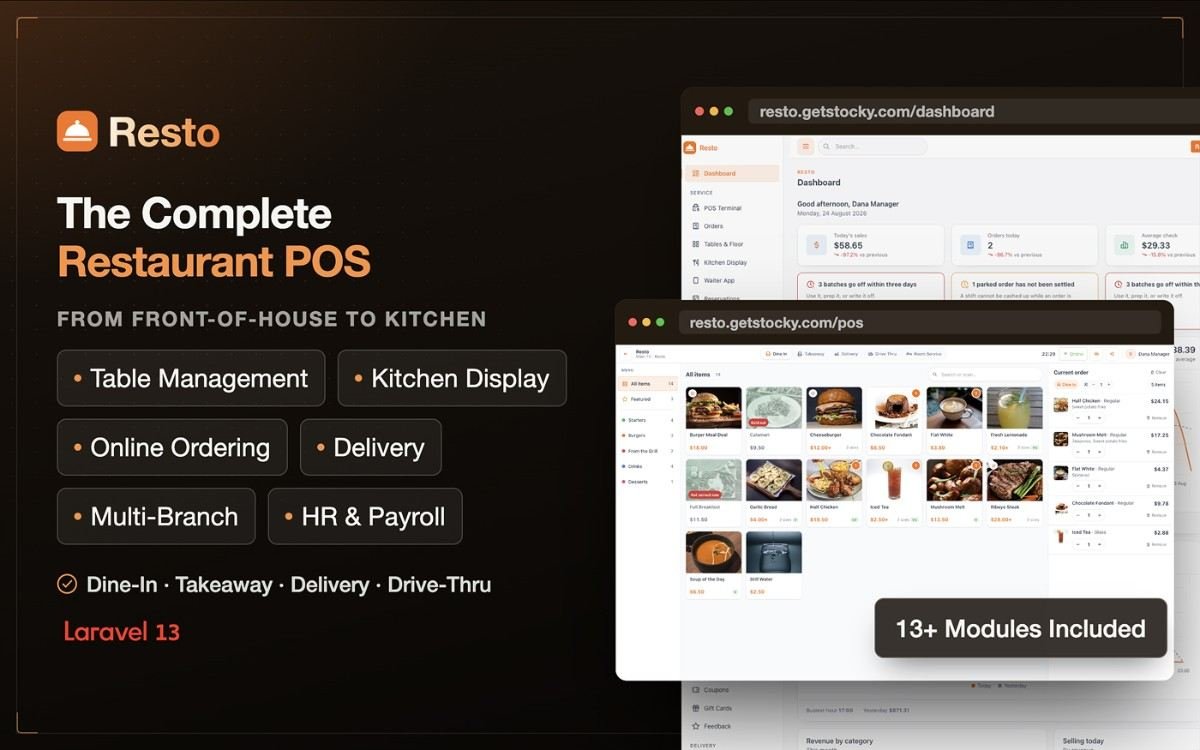
Resto — Restaurant POS, Management System, KDS & Online Ordering

All-in-one restaurant management with POS, KDS, inventory, accounting, delivery & online ordering.
2

Purchases

No reviews yet
Released:
August 28, 2026
Version:
1.0.0
Well documented
Lifetime Update

Resto is a complete, self-hosted restaurant management platform built to run your entire operation from one place. Manage sales, POS, kitchen operations, tables, orders, inventory, purchasing, customers, delivery, staff, accounting, reservations, and online ordering — all in one integrated system.

Resto — Restaurant POS, Management System Features

It goes beyond a traditional POS. When an order is placed, Resto can automatically update inventory, calculate food costs, record the financial transaction, update customer loyalty, send the order to the kitchen, and include everything in your reports — without entering the same information twice.

Self-hosted and subscription-free. Install Resto on your own server or compatible shared hosting and keep complete control of your restaurant data. There are no monthly SaaS fees or per-terminal licenses.

Why Choose Resto?

  • Complete restaurant management — POS, KDS, tables, inventory, purchasing, delivery, HR, accounting, reservations, and online ordering work together in one system.
  • Works on shared hosting — Built with Laravel and MySQL/MariaDB without requiring Node.js daemons, Redis, WebSockets, or queue workers.
  • Offline-ready POS — Continue taking orders when the internet connection goes down. Orders are stored locally and synchronized automatically when the connection returns.
  • Integrated inventory & accounting — Sales can automatically deduct ingredients, calculate food costs, and post the appropriate accounting entries.
  • Reliable financial records — Stock, loyalty, gift cards, payments, refunds, and accounting transactions are tracked through proper ledgers rather than editable balances.
  • Easy installation — A browser-based installer checks your server requirements, configures the application, sets up the database, and creates your administrator account.
  • Multi-language & RTL support — Includes 8 languages with full Arabic RTL support and a built-in translation editor.
  • Built for multiple locations — Manage branches, stock, staff, tables, terminals, pricing, taxes, and reports from a single installation.

Complete Restaurant POS

Designed for fast-paced restaurant service, the POS provides a touchscreen-friendly interface with everything your staff need to process orders quickly.

  • Fast product search, categories, variants and sizes
  • Modifiers with required/optional selections and pricing rules
  • Combo and meal builder
  • Dine-in, takeaway, delivery, drive-thru and room service orders
  • Table-based ordering
  • Park and recall orders
  • Send orders to the kitchen before payment
  • Split bills and partial payments
  • Cash, card, wallet, gift card, store credit and online payments
  • Tips and service charges
  • Discounts and manager-controlled voids
  • Line-level refunds
  • Thermal, laser and PDF receipt printing
  • Staff clock-in using PIN
  • Full offline POS support

Kitchen Display System

Keep the kitchen organized with a dedicated Kitchen Display System.

  • Multiple kitchen stations such as grill, fryer, cold and pass
  • Live order and ticket display
  • Order modifiers and table information
  • Configurable preparation time targets
  • Visual indicators for delayed orders
  • Bump, recall and ready controls
  • Automatic item routing to the correct kitchen station
  • Lightweight polling designed to work reliably on shared hosting

Tables & Floor Management

Manage your restaurant floor directly from the POS or waiter interface.

  • Multiple floors and dining areas
  • Drag-and-drop floor plan editor
  • Live table status
  • Open, move, merge and split table sessions
  • Track guests, orders and outstanding amounts
  • Table QR codes for scan-to-order
  • Works across desktop, tablet and mobile screens

Waiter App

Give your waiters a dedicated mobile-friendly interface.

The waiter app works as a Progressive Web App (PWA), allowing staff to install it directly on their phones and quickly access their tables during service.

Waiters can:

  • View their assigned tables
  • Take customer orders
  • Send courses to the kitchen
  • See which dishes are ready
  • Request bills
  • Manage orders directly from the restaurant floor

Online Ordering & QR Menu

Give customers a branded online ordering experience without relying entirely on third-party platforms.

  • Server-rendered online menu
  • Product pages with images, descriptions and options
  • Variants and modifiers
  • Cart and checkout
  • Dine-in ordering through table QR codes
  • Pickup and delivery ordering
  • Delivery-zone validation
  • Stripe online payments
  • Cash on delivery and pay-at-counter
  • Guest order tracking
  • Optional customer accounts
  • Saved addresses and order history
  • Loyalty balance
  • Opening hours and ordering controls
  • Custom logo, colors and language

Restaurant Inventory Management

Resto connects your menu directly with your inventory.

  • Ingredient management
  • Units of measurement and conversions
  • Recipes and sub-recipes
  • Recipes for different product variants
  • Automatic ingredient deduction when orders are completed
  • Stock movement ledger
  • Opening stock and adjustments
  • Purchases and consumption
  • Waste and returns
  • Stock transfers between branches
  • Stock valuation
  • Batch and expiry tracking
  • Stocktake and variance calculation
  • Reorder levels
  • Supplier management

Recipe-based inventory also makes food-cost calculations more accurate. When ingredient costs change, the cost of the dishes using those ingredients can be updated automatically.

Purchasing

Keep your purchasing process organized from supplier selection to receiving stock.

  • Supplier management
  • Supplier-specific ingredient pricing
  • Purchase orders
  • Approval and tracking
  • Partial or complete goods receiving
  • Short-delivery tracking
  • Actual landed-cost recording
  • Supplier payments
  • Outstanding supplier balances

Customers, Loyalty & Promotions

Build customer relationships and encourage repeat orders.

  • Customer profiles
  • Multiple saved addresses
  • Complete order history
  • Customer lifetime value
  • Customer groups
  • Group-based pricing
  • Loyalty points
  • Store credit
  • Gift cards
  • Coupons and promotional rules
  • Minimum-spend requirements
  • Usage limits
  • Per-customer limits
  • Branch and channel restrictions
  • Customer feedback and reviews

Delivery Management

Manage your own delivery operation directly from Resto.

  • Delivery dispatch board
  • Rider management
  • Rider assignment
  • Delivery status tracking
  • Delivery zones
  • Postcode-based or radius-based zones
  • Delivery fees
  • Minimum order amounts
  • Free-delivery thresholds
  • Estimated delivery times
  • Delivery income tracking

Reservations & Waitlist

Manage bookings and walk-in customers from one place.

  • Reservation calendar
  • Pending, confirmed, seated, completed, cancelled and no-show statuses
  • Configurable reservation slots
  • Table assignment
  • Party size and guest notes
  • Customer contact information
  • Waitlist management
  • Online reservation requests

Staff & HR

Manage your restaurant team without needing a separate system.

  • Employee profiles
  • Branch assignment
  • Roles and permissions
  • Pay rates
  • Working hours
  • Overtime
  • Commission
  • Leave entitlement
  • Tip sharing
  • Attendance
  • PIN-based clock-in/out
  • Timesheets
  • Leave requests and approvals
  • Payroll runs
  • Payslips
  • Activity history

Resto includes predefined roles for Owner, Manager, Cashier, Waiter, Chef, Storekeeper, Accountant and Rider, with granular permissions that can be customized for individual users.

Built-in Accounting

Turn operational activity into financial records automatically.

Resto includes double-entry accounting with automatic posting from restaurant operations.

  • Chart of accounts
  • Automatic accounting entries
  • Sales and payment posting
  • Cost of goods sold
  • Delivery and service income
  • Tax tracking
  • Tips payable
  • Purchase accounting
  • Expense accounting
  • Wastage accounting
  • Payroll entries
  • Manual journals
  • Account ledgers
  • Trial balance
  • Profit & loss
  • Balance sheet
  • Period closing
  • Expense management

This means your restaurant operations and financial records stay connected instead of requiring the same transaction to be entered into multiple systems.

Powerful Restaurant Reports

Get the information you need to understand how your restaurant is performing.

Sales Reports

Track:

  • Gross and net sales
  • Average order value
  • Orders and covers
  • Sales by day and hour
  • Sales by channel
  • Sales by order type
  • Sales by cashier
  • Sales by payment method
  • Discounts
  • Voids
  • Refunds
  • Tips

Food Cost & Menu Engineering

Understand which dishes are actually making money.

  • Food cost
  • Cost of goods sold
  • Gross margin
  • Dish-level profitability
  • Revenue by item
  • Modifier performance
  • Menu categories
  • Popularity and profitability analysis
  • Menu engineering matrix

Identify your Stars, Ploughhorses, Puzzles and Dogs so you can make better decisions about pricing and menu placement.

Inventory Reports

Monitor:

  • Current stock
  • Stock valuation
  • Ingredient consumption
  • Expected vs actual usage
  • Variance and shrinkage
  • Waste
  • Supplier spending
  • Purchase price changes
  • Low-stock items

Financial Reports

Review:

  • Profit & loss
  • Revenue
  • Cost of sales
  • Gross and net profit
  • Profit margins
  • Expenses
  • Tax reports
  • Tips
  • Discounts
  • Cash-up history

Reports can be filtered by period and exported to CSV.

Multi-Branch Management

Run multiple restaurant locations from a single Resto installation.

Each branch can have its own:

  • Inventory
  • Tables
  • POS terminals
  • Staff
  • Prices
  • Taxes
  • Opening hours
  • Online store settings
  • Reports

Transfer inventory between branches and view financial and operational information for individual locations or the business as a whole.

Flexible Taxes & Charges

Resto supports real-world tax configurations rather than limiting you to a single tax percentage.

  • Multiple taxes per tax group
  • Compound taxes
  • Tax-inclusive pricing
  • Fixed and percentage taxes
  • Service charges
  • Taxable/non-taxable service charges
  • Cash rounding
  • Item-level tax assignment
  • Branch-level tax configuration
  • Order-type tax configuration
  • Tax numbers on receipts and reports

REST API

Connect Resto with external applications and services through the versioned REST API.

The API includes endpoints for:

  • Menu
  • Orders
  • Stock
  • Ingredients
  • Customers
  • Reservations
  • Business summaries

Token-based authentication, permission-scoped API access and per-token rate limiting make it suitable for delivery platforms, mobile applications, BI systems and custom integrations.

Languages & RTL

Resto comes with 8 languages:

  • English
  • French
  • Spanish
  • German
  • Portuguese
  • Turkish
  • Hindi
  • Arabic

Arabic includes full RTL support across the administration panel, POS and storefront.

The built-in translation editor also allows you to add and manage your own translations without modifying application source files.

Modern & Customizable Interface

Customize the appearance of your restaurant system to match your brand.

  • Light mode
  • Dark mode
  • System theme
  • Primary color customization
  • Custom hex color
  • Corner-radius options
  • Custom logo and favicon
  • Responsive interface
  • Tabler-based UI

The POS, administration panel and online storefront are designed to work across phones, tablets, desktops and larger displays.

Backup & Maintenance

Keep your restaurant data under your control.

  • One-click database backups
  • Download backups from the dashboard
  • Manage and delete old backups
  • Version information
  • Straightforward update process
  • Global search
  • Demo mode
  • Demo data seeders

The backup system generates standard SQL files, so your database backup isn’t locked into a proprietary format.

Technical Specifications

  • Framework: Laravel 13
  • PHP: 8.3+
  • Database: MySQL / MariaDB
  • UI: Tabler 1.4, Tabler Icons
  • JavaScript: Alpine.js 3, Chart.js 4, SweetAlert2
  • Build: Vite 8
  • Offline POS: Service Worker
  • Online Payments: Stripe Checkout
  • QR Codes: Bacon QR Code
  • Architecture: Service-layer architecture
  • Source Code: Fully unencrypted

No Complex Infrastructure Required

Resto is deliberately designed to avoid unnecessary infrastructure requirements.

You don’t need:

  • Node.js daemons
  • Redis
  • WebSocket servers
  • Queue workers
  • exec() access
  • Vendor-specific printer drivers

If your hosting environment supports Laravel and MySQL/MariaDB, Resto can run there.

Server Requirements

  • PHP 8.3 or higher
  • MySQL 5.7+ or MariaDB 10.3+
  • Apache or Nginx with URL rewriting
  • Required Laravel PHP extensions
  • Writable storage/ and bootstrap/cache/ directories
  • SSL certificate recommended and required for Stripe payments

The built-in installer checks your server requirements before installation and identifies anything that needs attention.

What You Get

  • Full unencrypted source code
  • Compiled front-end assets
  • Browser-based installation wizard
  • Demo data
  • 8 language files
  • Documentation
  • Free lifetime updates
  • 6 months of included support

Perfect For

Resto is suitable for:

  • Restaurants
  • Cafés
  • Coffee shops
  • Pizzerias
  • Fast-food restaurants
  • QSR businesses
  • Food trucks
  • Cloud kitchens
  • Dark kitchens
  • Bakeries
  • Dessert and ice-cream shops
  • Canteens
  • Staff catering
  • Hotel restaurants
  • Room service
  • Multi-branch restaurant groups
  • Franchises
  • Developers building restaurant solutions for clients

One Platform. Your Entire Restaurant.

From the first order at the POS to the kitchen, inventory, delivery, accounting and final report, Resto keeps your restaurant operations connected in one self-hosted system.

You must log in and be a buyer of this download to submit a review.

Frequently Asked Questions - FAQs

Product

Is it possible to white label or customize your template?

You certainly can! Feel free to change the template branding, such as the name and logo, and customize it as needed. There is no need to attribute UI Lib.

What does the purchased package include?

Depending on the technology/framework, the purchased package includes a full source code that includes SASS, JavaScript/TypeScript, HTML, media, compiled assets, and build config files.

All of the demos, apps, pages, components, and plugins shown in the preview will also be included.

Payment

What payment methods are available?

We use Paddle for processing payments. You can pay using following methods

  • Cards (including Mastercard, Visa, Maestro, American Express, Discover, Diners Club, JCB, UnionPay, and Mada)
  • PayPal
  • Google Pay (Chrome only)*
  • Apple Pay (Safari only)*
What if I have a problem making the payment?

It is possible that your bank/card has a limitation; please contact your respective authority.

If you are still unsuccessful, please contact us at support@ui-lib.com

License

What does "End users can be charged" mean?

End users are the individuals or organizations who will be using the software that you'll build using our template. If you purchase Extended or Unlimited license then your end users can be charged.

How long are licenses valid?

A license is valid for lifetime. That is, once bought, you can use the item forever.

You can download the updated version from our website for 12 months. If you purchase unlimited license you can download the updated version for lifetime.

Support

What does Support Include?

When you purchase our item, you can contact our Support Team, where you can submit tickets/issues about product functionality, usage, and bug fixes.

Within 24-48 hours, you will receive responses directly from the product's creators (during business days).

How can I contact UI Lib

Simply mail us at support@ui-lib.com. Mention your issue and the product you've bought. Our support team will reach you.

© 2025 UI Lib. A product of Peak Pulse LLC.